
PCIe 4.0 vs. PCIe 5.0: Is the Upgrade Worth It?

The pursuit of raw speed defines the modern PC building experience. At the center of this race is Peripheral Component Interconnect Express, the high speed interface that dictates how fast your graphics card and storage drives talk to the processor.
While PCIe 4.0 only recently became the standard for high performance builds, PCIe 5.0 has already arrived to double the theoretical bandwidth once again. This rapid transition leaves many builders asking if the latest hardware offers a meaningful upgrade or just diminishing returns.
We analyze the technical jump from Gen 4 to Gen 5 to see if the massive throughput gains translate into real world performance for gamers and professionals.
Key Takeaways
- PCIe 5.0 doubles the bandwidth of PCIe 4.0, moving from 16 GT/s to 32 GT/s per lane.
- Sequential storage speeds have jumped from 7,000 MB/s to over 14,000 MB/s with the new standard.
- Current graphics cards do not yet saturate the bandwidth provided by PCIe 4.0 x16 slots.
- High speed Gen 5 storage requires substantial cooling solutions to prevent thermal throttling.
- Backward and forward compatibility allows hardware from different generations to work together seamlessly.
- PCIe 5.0 is currently a niche requirement for professionals, while PCIe 4.0 remains the standard for gamers.
Bandwidth Scaling and Technical Specifications
The progression of PCIe standards follows a consistent pattern of doubling the data rate with every new generation. This evolution ensures that hardware interfaces do not become a bottleneck as processors and graphics units grow more powerful.
Achieving these speeds requires significant upgrades to the physical infrastructure of the motherboard and the communication protocols that govern how data moves between components.
Raw Throughput and GigaTransfers
The most direct way to measure the jump from PCIe 4.0 to PCIe 5.0 is through GigaTransfers per second (GT/s). While PCIe 4.0 operates at 16 GT/s, PCIe 5.0 doubles this to 32 GT/s.
This measurement refers to the number of bits transferred per second over a single lane, accounting for the overhead of the encoding process. By doubling the frequency of the signal, the interface can move twice as much data in the same amount of time, providing a massive ceiling for high-bandwidth hardware.
Data Transfer Rates by Lane Configuration
When these transfer rates translate into usable bandwidth, the numbers become even more impressive. A single PCIe 4.0 lane (x1) offers roughly 2 GB/s of throughput, whereas a PCIe 5.0 lane provides 4 GB/s.
For a full-sized x16 slot typically used for graphics cards, PCIe 4.0 tops out at approximately 32 GB/s. PCIe 5.0 pushes this limit to 64 GB/s.
This overhead is particularly useful for multi-device configurations or specialized expansion cards that require massive data pipes to function without latency.
Signal Reliability and Physical Design
Moving data at 32 GT/s introduces significant challenges for signal integrity. At these frequencies, electrical interference and signal degradation become much more common.
To combat this, PCIe 5.0 utilizes updated surface-mount technology and improved PCB materials that reduce “cross-talk” between lanes. The physical layer improvements ensure that even though the data is moving faster, it remains accurate and reliable.
This necessitates higher manufacturing standards for motherboards, which often contributes to the higher cost of Gen 5-enabled hardware.
Hardware Compatibility and Platform Requirements
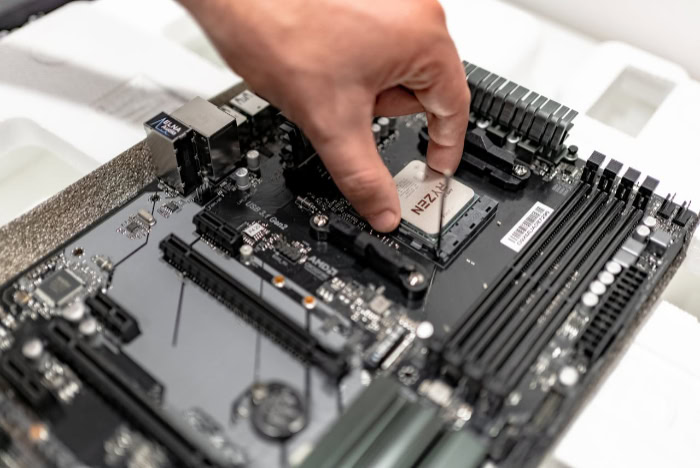
Adopting the newest standard requires a foundation of compatible hardware. Because PCIe 5.0 is a relatively recent addition to the consumer market, users must verify that their CPU and motherboard chipset specifically support the higher bandwidth.
Most modern platforms offer a mix of PCIe generations, often reserving the fastest lanes for the primary graphics card and the main storage drive.
CPU and Motherboard Support
The shift toward PCIe 5.0 began in earnest with Intel’s 12th Generation Alder Lake processors and has continued through the 13th and 14th Generations. On the AMD side, the Ryzen 7000 and 8000 series brought Gen 5 support to the AM5 platform.
To access these speeds, a user needs a compatible motherboard chipset, such as Intel’s Z790 or AMD’s X670E and B650E. These “Extreme” variants are specifically designed to provide the necessary routing for Gen 5 signals to the primary slots.
Backward and Forward Compatibility
One of the most user-friendly aspects of the PCIe standard is its total backward and forward compatibility. You can install a PCIe 4.0 graphics card into a PCIe 5.0 slot, or a PCIe 5.0 SSD into a PCIe 4.0 slot.
However, the connection will always operate at the speed of the slowest component. This “lowest common denominator” rule means that while your parts will work together safely, you will not see the speed benefits of Gen 5 unless every part of the chain, the CPU, the motherboard slot, and the device itself, supports the higher standard.
Lane Allocation and Distribution
Motherboards have a limited number of PCIe lanes provided by the CPU and the chipset. When using PCIe 5.0 devices, the way these lanes are distributed is critical.
On many consumer boards, installing a Gen 5 NVMe drive may “steal” bandwidth from the primary x16 graphics slot, dropping it to x8 mode to accommodate the drive. While an x8 PCIe 5.0 connection is technically as fast as an x16 PCIe 4.0 connection, this distribution can affect how users plan their builds and which slots they choose for their expansion cards.
NVMe Storage Speed and Thermal Demands

Storage technology has seen the most immediate and visible benefits from the transition to PCIe 5.0. While previous generations were fast enough for daily tasks, the latest NVMe drives push the boundaries of what consumers can expect from file transfer and loading speeds.
However, this performance comes with new environmental challenges within the PC case.
Sequential and Random Performance
The performance gap between generations is stark when looking at sequential read and write speeds. Top-tier PCIe 4.0 drives generally max out around 7,500 MB/s.
In contrast, early PCIe 5.0 drives have already reached 12,000 MB/s, with newer models pushing toward 14,000 MB/s and beyond. While random access speeds, which dictate how snappy the OS feels, show more modest gains, the sheer throughput for moving large datasets is nearly double what was possible just a few years ago.
Managing Large File Workflows
For professionals working with high-resolution video or complex 3D assets, the increased bandwidth of PCIe 5.0 is a significant advantage. Editing uncompressed 8K video or moving multi-hundred-gigabyte project files becomes much faster, reducing the time spent waiting for progress bars.
In these specific workloads, the storage drive is often the bottleneck, so doubling the interface speed provides a direct and measurable improvement in productivity.
Thermal Management and Cooling Solutions
The controllers used in PCIe 5.0 SSDs generate a substantial amount of heat to maintain these extreme speeds. Unlike Gen 4 drives, many of which could run with a simple flat heatsink, Gen 5 drives often require much more robust cooling.
Many Gen 5 SSDs ship with massive, tall heatsinks, and some even include small active cooling fans. Without proper airflow or a substantial cooling solution, these drives can quickly hit their thermal limits and throttle their speeds back to Gen 4 levels or lower to protect the hardware.
Graphics Performance and Bandwidth Utilization

While the storage market has moved quickly to embrace higher speeds, the gaming sector sees a more gradual shift. The connection between a graphics card and the processor is vital for maintaining high frame rates, but the actual data requirements of current software determine whether the extra headroom of a newer standard is necessary.
Graphics Card Power Utilization
Modern flagship graphics cards, including the NVIDIA RTX 40-series and AMD RX 7000-series, are built primarily around the PCIe 4.0 interface. Testing shows that even the most powerful cards on the market today do not fully saturate the 32 GB/s bandwidth offered by a PCIe 4.0 x16 slot.
In most scenarios, moving these cards to a PCIe 5.0 slot results in a negligible performance gain, as the bottleneck typically lies within the GPU core or memory itself rather than the bus interface.
DirectStorage and Asset Streaming
The potential for PCIe 5.0 in gaming lies mostly in advanced technologies like DirectStorage. This API allows the graphics card to fetch data directly from a high-speed NVMe drive, bypassing the traditional route through the CPU.
With a Gen 5 SSD providing speeds of up to 14,000 MB/s, asset streaming becomes significantly faster. This leads to faster load times and a reduction in visible pop-in for open-world environments, though game support for these features is still in the early stages.
Frame Rates and Stability Benchmarks
Analyzing frame rates and system stability across different generations reveals that PCIe 4.0 remains highly competitive. Most performance data indicates that the difference in average frames per second between Gen 4 and Gen 5 configurations is often less than one percent.
For the average gamer, the stability of the system and the consistency of frame times are unaffected by the choice of interface, provided the card has access to sixteen lanes of Gen 4 bandwidth.
Value Assessment and System Relevance

Investing in the latest hardware requires a balance between current needs and future requirements. The price premium for PCIe 5.0 components is notable, impacting the cost of both the motherboard and the storage devices.
For many builders, the decision hinges on whether the performance gains justify the additional expense or if the previous standard provides a better return on investment.
Workstations vs. Enthusiast Gaming
Professional users often find a clear benefit in adopting PCIe 5.0. In environments where massive data files move constantly, such as 4K or 8K video production and large-scale 3D rendering, the time saved by doubled storage speeds is substantial.
For enthusiast gamers, the benefits are less immediate. While having the latest technology is a priority for high-end builds, the actual impact on the gaming experience does not always align with the increased cost of the hardware.
Identifying the Performance Sweet Spot
PCIe 4.0 currently represents a stable middle ground for the majority of modern PC builds. It provides more than enough bandwidth for all existing consumer graphics cards and offers high-speed storage that satisfies the requirements of nearly every modern application.
For builders working within a specific budget, sticking with Gen 4 allows for more spending on hardware like a more powerful GPU or a faster processor, which has a much larger impact on daily performance.
Strategies for System Relevance
Planning for the long term involves looking at how long a platform will remain compatible with future upgrades. Choosing a motherboard with PCIe 5.0 support ensures that the system is ready for upcoming generations of hardware.
As future graphics cards begin to demand more than what PCIe 4.0 can provide, having a Gen 5-capable slot prevents the need for a full motherboard replacement. This approach is ideal for users who prefer to keep their core system for several years while upgrading individual components as they arrive on the market.
Conclusion
PCIe 5.0 doubles the transfer rates of PCIe 4.0 from 16 GT/s to 32 GT/s. This allows storage speeds to reach up to 14,000 MB/s.
While professional workloads benefit from this massive bandwidth, gaming performance remains largely unchanged. Most users will find the best value in PCIe 4.0 hardware today, while PCIe 5.0 provides a path for future expansion.
The hardware ecosystem is currently in a state of transition, with high end platforms supporting the new standard even as most consumer software catches up.
Frequently Asked Questions
Does PCIe 5.0 improve gaming performance?
Current graphics cards do not see a significant increase in frame rates when moving from PCIe 4.0 to PCIe 5.0. While the newer standard provides more bandwidth, today’s games and GPUs are unable to utilize the extra headroom. The performance difference in most modern titles is typically within a negligible margin.
Can I use a PCIe 4.0 SSD in a PCIe 5.0 slot?
Yes, PCIe slots are backward and forward compatible. You can easily install a PCIe 4.0 SSD into a newer PCIe 5.0 slot without any issues. The drive will function perfectly, though it will be limited to its own PCIe 4.0 speeds rather than the faster capabilities of the motherboard slot.
Why do PCIe 5.0 SSDs require large heatsinks?
PCIe 5.0 controllers work much harder to process data at extreme speeds, which generates significant heat. Without a large heatsink or active cooling, these drives will quickly reach high temperatures and throttle their performance. Robust thermal management is required to maintain the high transfer rates that define this generation.
Is a PCIe 5.0 motherboard necessary for the RTX 4090?
A PCIe 5.0 motherboard is not required for the RTX 4090. This high-end graphics card uses a PCIe 4.0 interface and fits perfectly into a PCIe 4.0 x16 slot. Even when placed in a newer slot, there is no measurable performance gain since the card cannot exceed PCIe 4.0 bandwidth limits.
When should I choose PCIe 5.0 over PCIe 4.0?
You should prioritize PCIe 5.0 if you are a professional working with massive file transfers or if you want to build a system that supports future hardware. For general use and gaming, PCIe 4.0 offers a better price to performance ratio. Professionals benefit from the speed, while enthusiasts gain long term compatibility.
About the Author: Elizabeth Baker


