
ThinkPad vs. MacBook: Which Should You Buy?

Lenovo’s ThinkPad and Apple’s MacBook stand as the two most trusted laptop families for corporate professionals, university students, and everyday buyers. Choosing between them means weighing two distinct engineering philosophies that shape every detail of daily computing.
Lenovo prioritizes practical business utility, hardware customization, wide port selection, and rugged durability. Conversely, Apple focuses on sleek aluminum hardware, exceptional battery efficiency, high-resolution displays, and seamless cross-device integration.
Matching the right machine to daily workloads requires comparing specific model lineups, physical ergonomics, operating systems, processor architectures, and long-term maintenance costs. Evaluating how each platform handles office spreadsheets, creative software, unplugged travel, and hardware upgrades ensures buyers invest in a portable computer built for their exact priorities.
Key Takeaways
- Select a MacBook for Unplugged Endurance and Multimedia: Apple’s M5 and M6 series laptops deliver 14 to 24 hours of battery life without losing speed on battery power, alongside standard high-resolution displays and six-speaker sound systems.
- Choose a ThinkPad for Ergonomic Typing and Built-In Ports: Lenovo’s business machines provide deep-travel, spill-resistant keyboards with the red TrackPoint nub, plus built-in USB-A, Thunderbolt 4, and full-size HDMI ports that eliminate dongle clutter.
- Match the Operating System to Required Software: Finance professionals relying on Windows-only Microsoft Excel macros and engineers running CAD packages need a Windows 11 ThinkPad, whereas video editors using Final Cut Pro and iOS developers require macOS.
- Factor In Post-Purchase Upgrades and Repairability: Mainstream models like the ThinkPad T14 Gen 7 allow owners to replace the SSD, swap the battery, and upgrade modular LPCAMM2 memory up to 64GB, while MacBooks have permanently soldered RAM and storage.
- Compare Upfront Discounts Against Resale Value: Lenovo frequently discounts ThinkPad retail prices by 30% to 50% during seasonal sales, whereas Apple maintains strict pricing but rewards owners with stronger second-hand resale values.
Overview of Product Lineups and Model Equivalents
Comparing Lenovo and Apple starts with decoding their catalog structures. Apple maintains a tight, consumer-friendly portfolio divided primarily by thermal design and screen size, whereas Lenovo segments its massive commercial catalog by weight, expandability, and corporate budget tiers.
Apple’s Streamlined Options: MacBook Air and MacBook Pro
Apple divides its core laptop family into two main lines, supplemented by the budget-oriented MacBook Neo for basic everyday tasks. The MacBook Air comes in 13-inch and 15-inch sizes powered by the M5 chip.
Built for everyday portability, it features silent fanless operation, 16GB of starting unified memory, and plenty of speed for general office work, web research, or university assignments.
For heavier workloads, the MacBook Pro is available in 14-inch and 16-inch sizes. It adds active cooling fans for sustained high-speed computing, extra connectivity ports, and brighter 120Hz ProMotion displays.
Buyers can choose the entry-level 14-inch MacBook Pro with the M6 chip, or step up to M5 Pro and M5 Max configurations offered with either Mini-LED Liquid Retina XDR panels or tandem OLED PROLED XDR touchscreen displays.
Lenovo’s Business Categories: X1, T, P, L, and E Series
Lenovo organizes the ThinkPad family into five primary lettered series tailored to specific enterprise roles and budgets. The ThinkPad X1 Series, led by the 14-inch ThinkPad X1 Carbon Gen 14 Aura Edition, represents the ultra-lightweight flagship tier.
Starting at under 2.2 lbs (1 kg), it is built for executives and frequent flyers who want premium materials and maximum mobility.
The ThinkPad T Series, including the T14 Gen 7, slim T14s, and larger T16, serves as the classic corporate workhorse lineup balanced for durability, port variety, and everyday productivity. For extreme computing demands, the ThinkPad P Series (such as the P1 and P16) delivers mobile workstation power with dedicated graphics for heavy engineering, data science, and 3D design.
Finally, the ThinkPad L and E Series provide budget-friendly alternatives that retain the signature ThinkPad keyboard and sturdy build quality at a lower entry cost.
Direct Model Matchups by Size and Tier
Comparing specific models by size and price tier helps narrow down the exact competitors across both brands:
- Ultraportable Matchup: The 14-inch ThinkPad X1 Carbon Gen 14 competes directly against the 13-inch and 15-inch MacBook Air M5 for mobile professionals, though the X1 Carbon commands a higher executive price tag.
- Everyday Professional Matchup: The ThinkPad T14 Gen 7 and T14s match up against the 14-inch MacBook Pro with the base M6 chip, serving software developers, analysts, and business managers.
- Heavy Workstation Matchup: The ThinkPad P1 and P16 go head-to-head against the 16-inch MacBook Pro equipped with M5 Pro or M5 Max chips for 3D rendering, video production, and local artificial intelligence workloads.
Physical Design, Ergonomics, and Connectivity
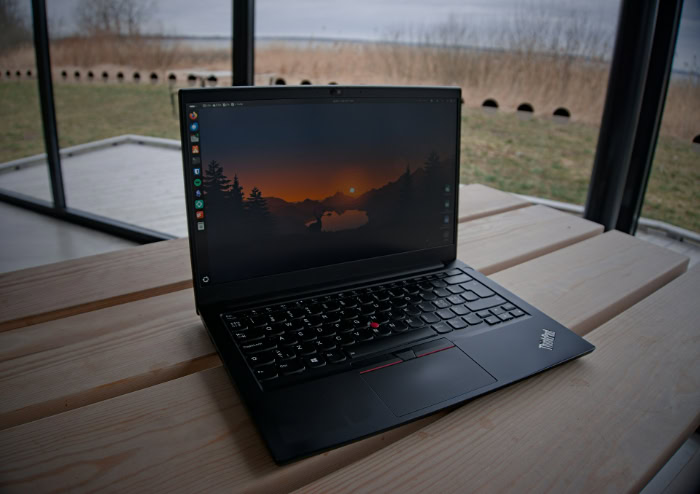
Daily comfort depends heavily on physical touchpoints, visual clarity, and how easily a laptop connects to desk peripherals. Lenovo and Apple take opposite approaches to input methods, chassis materials, and external ports.
Input Devices: Keyboard Comfort vs. Trackpad Precision
Typing comfort remains the defining strength of a ThinkPad. Lenovo uses scalloped keycaps with deep travel and crisp tactile feedback that reduce finger fatigue during multi-hour writing sessions.
In the center of the keyboard sits the iconic red TrackPoint nub, allowing typists to move the cursor and click via dedicated buttons above the touchpad without lifting their hands from the home row.
Apple leads the industry in trackpad engineering. Every MacBook features a massive glass Force Touch trackpad that uses haptic motors to register uniform, precise clicks anywhere on its surface.
It is paired with Apple’s Magic Keyboard, which utilizes a shallower scissor-switch mechanism that feels stable and snappy, though it offers less vertical cushion than a ThinkPad.
Display Quality, Audio Output, and Webcam Resolution
Every MacBook ships with a high-resolution, color-accurate screen, a rich multi-speaker audio system with force-canceling woofers for strong bass, and a sharp 12MP Center Stage webcam. Even the MacBook Air offers a crisp Liquid Retina panel, while MacBook Pro models deliver 1,600 nits of peak HDR brightness on Mini-LED screens and up to 2,000 nits on tandem OLED PROLED XDR configurations.
ThinkPad displays vary widely depending on the configuration selected at checkout. Most corporate models ship with matte anti-glare IPS panels that prevent harsh reflections under fluorescent office lights.
While buyers can upgrade a ThinkPad T14 Gen 7 or X1 Carbon Gen 14 to a vibrant 2.8K 120Hz OLED display and a 10MP webcam, base configurations often come with dimmer 400-nit screens covering only 45% of the NTSC color space alongside modest stereo speakers.
Port Variety and External Monitor Support
ThinkPads prioritize adapter-free convenience in conference rooms and offices. A standard ThinkPad T14 Gen 7 includes dual Thunderbolt 4 ports, dual full-size USB-A ports, an HDMI port, an RJ-45 Gigabit Ethernet jack, and optional 5G nano-SIM and smart card slots, supporting up to three external monitors alongside the internal screen.
Apple favors a minimalist chassis profile. The MacBook Air includes a MagSafe 3 charging connector, a headphone jack, and dual Thunderbolt 4 ports that support two external displays with the lid open, requiring an external USB-C hub for USB-A flash drives or HDMI cables.
The MacBook Pro improves built-in connectivity by providing three Thunderbolt 4 or Thunderbolt 5 ports, a full-size HDMI port, and an SDXC card reader.
Chassis Durability and Spill Protection
Lenovo engineers ThinkPads to survive rough handling in the field. Frames constructed from carbon fiber, magnesium alloy, and aluminum undergo MIL-STD-810H military testing to verify resistance against mechanical shock, vibration, dust, high humidity, and extreme temperatures.
Furthermore, spill-resistant keyboards help protect internal electronics from minor liquid accidents.
Apple machines its MacBook enclosures from a solid block of recycled aluminum. The unibody construction eliminates keyboard deck flex and gives the laptop a dense, refined feel, weighing around 2.7 lbs (1.22 kg) on the 13-inch Air and between 3 lbs (1.36 kg) and 4 lbs (1.81 kg) on Pro models.
However, stiff aluminum edges dent more easily when dropped on hard floors, and the keyboard lacks liquid drainage channels.
Software Platforms, Daily Applications, and Device Ecosystems

Hardware specifications only tell half the story, as the pre-installed operating system dictates how users organize files, run specialized industry applications, and interact with their mobile devices.
Desktop Environments: Windows and Linux vs. macOS
Windows 11 comes standard on most ThinkPads, serving as the universal backbone for corporate IT departments. It provides broad compatibility with legacy enterprise programs, flexible window snapping, Active Directory security management, and integrated Copilot+ AI tools.
In addition, Lenovo offers official factory support for Ubuntu Linux and Fedora Linux across its T, X1, and P series, making ThinkPads a favorite among open-source developers.
MacBooks run macOS, an operating system celebrated for its clean visual layout, stability, and UNIX foundations. Built-in utilities such as Quick Look for instant file previews, Spotlight for rapid system search, and Time Machine for automated backups streamline everyday file management without requiring third-party utilities.
Office Suites, Financial Spreadsheets, and Specialized Tools
Although Microsoft Office runs on both platforms, advanced Microsoft Excel users in investment banking, accounting, and corporate finance strongly favor ThinkPads. The Windows version of Excel supports rapid Alt-ribbon keyboard shortcuts, complex Visual Basic for Applications (VBA) macros, Power Pivot data modeling, and enterprise database plugins that are either missing or slower on macOS.
Conversely, MacBooks provide exclusive access to Apple’s professional creative applications, including Final Cut Pro for video editing and Logic Pro for music production. For heavy engineering and architecture workflows, ThinkPads remain essential due to Windows-exclusive CAD and 3D modeling packages like SolidWorks, AutoCAD, and Revit, as well as broader compatibility with PC video games.
Mobile Phone Integration and Cross-Device Continuity
Owners of an iPhone, iPad, or Apple Watch experience effortless continuity when working on a MacBook. Files transfer wirelessly in seconds via AirDrop, text copied on an iPhone pastes directly onto a MacBook via Universal Clipboard, and Sidecar turns an iPad into a wireless secondary monitor.
Users can also control their phone screen directly from their desktop via iPhone Mirroring and answer phone calls or iMessages natively.
ThinkPads connect to Android smartphones and iPhones using Microsoft’s Phone Link application alongside Lenovo’s Aura Edition tap-to-pair tools. Users can view mobile notifications, reply to text messages, and drag photos between a flagship Android phone and Windows 11.
While convenient, Phone Link offers fewer cross-device features for iPhone owners compared to Apple’s native software suite.
Processor Power, Battery Endurance, and Acoustics

Modern laptop processors balance high-speed computing with energy efficiency. Differences in silicon design directly affect how fast applications launch, how long a battery lasts on a cross-country flight, and how loud cooling fans spin.
Chip Architecture: Apple Silicon vs. Intel, AMD, and Qualcomm
Apple’s M5 and 2 nm M6 series chips utilize a unified memory architecture that places the CPU, GPU, Neural Engine, and RAM onto a single silicon package. Because the processor and graphics cores share the same high-bandwidth memory pool rather than copying data across separate buses, MacBooks deliver instant wake times, smooth multitasking, and exceptional capability in video editing and local AI tasks.
Lenovo gives ThinkPad buyers the freedom to select from three distinct processor families depending on workload and budget: Intel Core Ultra Series 3 (Panther Lake), AMD Ryzen AI PRO, and ARM-based Qualcomm Snapdragon X series chips. Intel and AMD configurations guarantee complete compatibility with older x86 corporate software, while Snapdragon models prioritize low power consumption.
All-Day Battery Life and Unplugged Speed
MacBooks set the industry benchmark for consistent battery endurance. Depending on the model, a MacBook Air or MacBook Pro delivers 14 to 24 hours of light productivity and multi-day standby time on a single charge.
Furthermore, Apple Silicon suffers zero drop in computing speed when unplugged from the wall, running heavy exports just as fast on battery power as on AC power.
Battery life on a ThinkPad depends heavily on the chosen hardware configuration. A ThinkPad T14 Gen 7 or X1 Carbon Gen 14 equipped with an energy-efficient processor and a standard 400-nit IPS screen can achieve 12 to 18 hours of light office work.
However, selecting a high-wattage P series workstation processor or a bright 2.8K OLED display reduces unplugged runtime noticeably, and Windows power profiles often lower peak clock speeds on battery to conserve energy.
Thermal Output and Fan Noise Under Heavy Loads
Acoustics represent one of the most noticeable daily differences between the two brands. The MacBook Air contains no internal cooling fans at all, operating in complete silence even when compiling code or exporting photos.
The MacBook Pro includes dual fans, but they remain turned off during routine web browsing, document editing, and video calls, only spinning up with a quiet hum under sustained multi-core loads.
Thin Windows laptops rely more heavily on active airflow. On compact machines like the ThinkPad X1 Carbon and T14, internal fans spin up audibly during simultaneous video conferences, background Windows 11 security updates, and heavy spreadsheet calculations, producing noticeable warm air from the exhaust vents.
Ownership Value, Maintenance, and Ideal User Profiles

Evaluating the total cost of ownership involves looking past the initial sticker price. Buyers must consider retail discount cycles, memory upgrade fees, internal repairability, and second-hand market demand.
Purchase Price, Memory Tiers, and Long-Term Resale Value
Apple maintains steady retail pricing throughout the year, starting around $1,099 for the 13-inch MacBook Air and $1,599 for the 14-inch MacBook Pro, while charging $200 to $400 for each tier of additional unified memory or SSD storage. Lenovo posts high initial retail prices on its store, such as $1,750 or more for a ThinkPad T14 Gen 7, but runs frequent seasonal promotions, corporate portal discounts, and bundle deals that routinely slash 30% to 50% off the list price.
When upgrading after three or four years, MacBooks hold a higher percentage of their original purchase value on the private resale market. ThinkPads depreciate faster for individual sellers because large corporations retire thousands of leased ThinkPads every three years, flooding the refurbished market with affordable second-hand business laptops.
Component Upgrades, Battery Swaps, and Repair Access
Serviceability is a major advantage for Lenovo’s mainstream workhorses. Loosening standard screws on the bottom cover of a ThinkPad T14 Gen 7, L series, or P series laptop provides direct access to the internal layout.
Owners and IT technicians can easily swap a worn battery, replace the M.2 NVMe SSD, clean the cooling fan, or upgrade modular LPCAMM2 or SO-DIMM memory up to 64GB. Ultrathin flagship models like the ThinkPad X1 Carbon solder their RAM to minimize thickness, though the SSD and battery remain accessible.
Apple seals the hardware inside every MacBook Air and MacBook Pro. Both the unified memory and the flash storage modules are soldered permanently onto the main logic board, making post-purchase RAM or SSD upgrades impossible.
Buyers must calculate their storage and memory requirements for the next several years before placing their initial order.
Ideal Match by Role: Corporate Work, Media Creation, and Software Development
Matching a laptop to your daily profession makes the final choice clear:
- When to Choose a ThinkPad: Best suited for financial analysts, accountants, mechanical and civil engineers, enterprise IT administrators, Linux enthusiasts, and heavy typists who value tactile keyboards, built-in ports, modular repairs, and physical durability.
- When to Choose a MacBook: Best suited for graphic designers, video and audio editors, iOS and full-stack software developers, university students, and iPhone owners who prioritize screen brilliance, speaker quality, silent operation, and all-day unplugged battery life.
Conclusion
Lenovo’s ThinkPad and Apple’s MacBook each lead their respective categories by excelling at different priorities. A ThinkPad stands out as a versatile, durable, and practical productivity workhorse built around typing comfort, adapter-free port access, hardware serviceability, and full Windows 11 or Linux compatibility.
A MacBook shines as an efficient, refined multimedia and mobile powerhouse that pairs silent operation and multi-day battery stamina with top-tier screens, studio-quality audio, and tight Apple ecosystem integration.
Answering three final questions will point directly to the right purchase:
- What software drives your daily workflow? If daily tasks rely on Windows-exclusive Microsoft Excel macros, legacy corporate tools, or engineering CAD suites, buy a ThinkPad; if your work centers on macOS creative apps, UNIX-based development, or general web productivity, choose a MacBook.
- How often do you work away from a power outlet? Frequent flyers and campus commuters who need 14 to 24 hours of uncompromised speed on battery power will prefer a MacBook, whereas desk-based professionals who plug into multiple monitors and Ethernet cables will appreciate a ThinkPad.
- Which smartphone is in your pocket? iPhone and iPad owners gain daily convenience from AirDrop, Universal Clipboard, and iMessage on a MacBook, while Android and Linux users fit naturally into the ThinkPad ecosystem.
Frequently Asked Questions
Which laptop lasts longer, a ThinkPad or a MacBook?
Both laptops easily last five to seven years of daily use, though they endure in different ways. ThinkPads survive physical drops, liquid spills, and component wear better because owners can easily replace the battery, SSD, and memory modules. Conversely, MacBooks maintain fast, quiet performance and long battery runtimes for years thanks to efficient Apple Silicon processors.
Can you upgrade the RAM and storage on a ThinkPad or a MacBook after buying it?
You cannot upgrade the RAM or storage on any modern MacBook, whereas many ThinkPads allow internal upgrades. Apple solders memory and storage chips directly to the logic board, requiring buyers to select permanent specifications upfront. Workhorse models like the ThinkPad T14 Gen 7 and P16 offer replaceable M.2 SSDs and modular memory slots.
Why do finance professionals and accountants prefer ThinkPads over MacBooks?
Finance professionals and accountants prefer ThinkPads because the Windows version of Microsoft Excel includes advanced tools missing on macOS. Financial analysts rely on rapid Alt-based keyboard shortcuts, complex Visual Basic macros, Power Pivot data modeling, and enterprise plugins that only run natively on Windows 11. Additionally, the tactile ThinkPad keyboard speeds up data entry.
Is a ThinkPad or a MacBook better for computer science students and programmers?
Both laptops are excellent for programming, so the better choice depends on your target software platform. A MacBook is essential for building iOS or macOS apps in Xcode and offers a native UNIX terminal out of the box. A ThinkPad is superior for native Linux installations, Windows .NET development, and budget-friendly memory upgrades.
Do MacBooks really have better battery life than Lenovo ThinkPads?
MacBooks consistently deliver longer and more predictable battery life than most Lenovo ThinkPads. Powered by Apple’s M5 and M6 chips, modern MacBook Air and MacBook Pro models run for 14 to 24 hours on a charge without slowing down. While Snapdragon and low-power Intel ThinkPads offer solid endurance, high-performance ThinkPads with OLED screens drain noticeably faster.
About the Author: Julio Caesar


