
What Is a LAN (Local Area Network)? Explained
A smartphone streams high-definition video to a television while a nearby laptop sends documents to a wireless printer down the hall. Such seamless interactions rely on a Local Area Network, commonly abbreviated as a LAN.
By definition, a LAN is a private computer network that links devices within a limited geographic space, such as a residence, school, or corporate office. Behind the scenes, dedicated hardware along with varied wired or wireless connectivity methods move traffic efficiently across local environments.
Recognizing how local networks function highlights significant advantages in data transfer speeds, resource sharing, and equipment consolidation, while spotlighting essential protective measures required to defend interconnected systems from unauthorized access.
Key Takeaways
- Local Area Networks operate independently of external internet connections, allowing local file transfers, media streaming, and printing even during broadband service outages.
- Internal wired transfers through Cat6 Ethernet cables reach speeds between 1 Gbps and 10 Gbps, transferring local files significantly faster than standard residential internet bandwidth limits.
- Routers act as gateway devices that connect private networks to the public internet, whereas switches direct local traffic directly between specific hardware components using MAC addresses.
- Combining stationary machines on wired Ethernet with mobile devices on Wi-Fi creates an efficient hybrid arrangement that preserves wireless bandwidth for portable electronics.
- Isolating smart home gadgets, security cameras, and guest users onto separate Virtual LANs (VLANs) stops malware from moving laterally toward personal computers and sensitive data.
Concept and Scope of a Local Area Network
Local computing relies on interconnected systems to share information, route communications, and link shared resources. Understanding how a local area network defines its perimeter, handles internal device identification, and functions independently of external service providers establishes the foundation for evaluating everyday network technology.
Definition and Physical Boundaries
A Local Area Network, or LAN, consists of two or more interconnected computers and peripheral devices positioned within a defined, compact geographic area. Unlike wide-reaching telecommunication networks that span cities or continents, a local network operates inside a distinct physical perimeter.
Typical settings include single-family residences, small commercial stores, university classrooms, and multi-story corporate offices.
The boundary of a local network is determined by physical space, administrative ownership, and connectivity hardware. In a residence, the network boundary rarely extends past the outer walls and yard of the property.
In commercial environments, a single local network might serve a single room, an entire floor, or a cluster of several adjacent office buildings connected by private wiring. Because one individual, school, or organization owns or manages the infrastructure within this perimeter, the administrator maintains full control over device connections, security policies, and performance settings.
Communication Principles Among Local Devices
Devices linked to a local network rely on standardized addressing systems to locate and exchange data with one another. When a device connects, it is assigned a private Internet Protocol (IP) address.
This logical numerical label identifies the device within the local subnet and ensures data reaches the proper destination. Alongside the IP address, each device possesses a Media Access Control (MAC) address, a unique physical identifier permanently assigned to its network hardware during manufacturing.
Local network switches use MAC addresses to deliver data directly between specific hardware components.
Communication within a local environment differs significantly from communication across the broader internet. Internal local traffic moves directly across switches or wireless access points without ever leaving the private subnet.
For example, sending a photo from a smartphone to a nearby laptop transfers data solely across local cables or radio frequencies. Conversely, external internet traffic requires a gateway device, such as a router, to translate private local IP addresses into a public IP address.
The router forwards outgoing requests to external servers and directs incoming responses back to the original local requester.
Autonomous Operation Without an Internet Connection
A common misconception is that a local area network requires an active internet connection to operate. An internet connection simply provides an external pathway outside the local perimeter.
The internal framework of switches, cables, and wireless access points functions without any connection to an internet service provider.
Local networks perform numerous complex computing tasks entirely offline. Users can transfer multi-gigabyte files between desktop computers, stream locally stored movies from a media server to a television, or send documents to a network printer during an external service outage.
Network-attached backup systems continue to archive files automatically, and local multi-user software runs uninterrupted because all routing and packet delivery occur strictly within the local physical boundary.
Essential Hardware and Physical Infrastructure

Physical infrastructure forms the foundation of any local network, providing the circuitry, transmission media, and routing logic required to distribute data packets. Specific hardware devices work in concert to direct network traffic, link hardware across distances, and translate electrical or radio signals into digital data.
Traffic Direction: Routers and Switches
Network switches and routers serve distinct purposes in steering traffic across local environments. A network switch acts as a central hub within the local network.
When a computer sends a packet of information to another machine, such as a desktop sending a print job to an office printer, the switch reads the recipient hardware MAC address and directs the packet directly to that specific device port. By isolating communication between the sending and receiving hardware, switches prevent unnecessary data collisions and maintain high internal data speeds.
A router functions as the gateway between two distinct networks, typically connecting the private local network to the public internet. While switches oversee internal delivery, the router inspects data packets heading outside the local subnet and directs them across external pathways.
Modern home and small-business routers also incorporate Dynamic Host Configuration Protocol (DHCP) servers to automatically assign private IP addresses to local hardware, along with Network Address Translation (NAT) software to ensure multiple devices can share a single public connection safely.
Physical Media: Ethernet and Fiber-Optic Cables
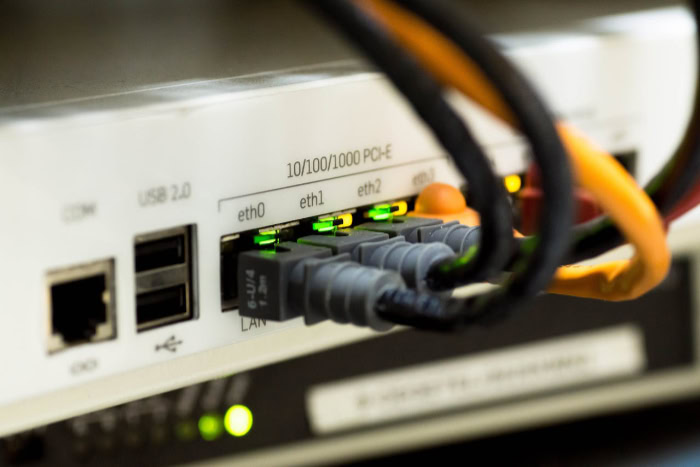
Physical cabling supplies the most dependable medium for transmitting data between network components. Twisted-pair copper cables, such as Cat6, remain the standard choice for home, school, and commercial environments.
Cat6 cables contain four pairs of twisted copper wires engineered to reduce signal crosstalk and electrical noise. These cables support transfer rates of 1 Gbps across distances up to 328 feet (100 meters), and up to 10 Gbps over shorter runs of 180 feet (55 meters).
For larger installations, high-speed fiber-optic cables provide superior performance over extensive distances. Fiber-optic lines transmit data as pulses of light through thin strands of glass or plastic, making them completely immune to electromagnetic interference from heavy machinery, elevator motors, or fluorescent lighting.
Commercial facilities rely on fiber-optic links to form the high-capacity backbone connecting separate wiring closets, different building floors, or standalone campus facilities situated several miles (several kilometers) apart.
Device Interfaces: Network Interface Cards and Access Points
Every device connected to a network requires dedicated interface hardware to participate in communication. A Network Interface Card, or NIC, is the physical component inside a computer, gaming console, or printer that bridges the system processor to the network media.
The card formats outgoing data into standard network packets and converts incoming electrical, optical, or radio signals into information the operating system can process.
Wireless access points expand this infrastructure by bridging radio signals to the physical wired network. An access point connects directly to a switch or router through an Ethernet cable, receiving wired data and broadcasting it across radio frequencies.
Mobile devices connect to the access point wirelessly, allowing users to move freely within range while maintaining continuous access to all wired local resources.
Wired and Wireless Architecture

Configuring a local network requires balancing speed, reliability, and convenience. Network designers choose between physical Ethernet wiring, radio frequency transmissions, or blended arrangements that draw on the strengths of each medium.
Wired Ethernet Configurations
Traditional wired networks rely entirely on physical cables linking every workstation, server, and peripheral to switches. This architecture offers unmatched stability and data delivery speeds.
Wired connections deliver full duplex communication, enabling devices to send and receive data simultaneously at speeds of 1 Gbps, 2.5 Gbps, or 10 Gbps without packet loss or shared radio congestion.
Minimal latency represents another major advantage of wired setups. Data packets travel through copper or fiber lines with almost zero delay, which is critical for real-time applications such as video conferencing, financial transactions, and competitive online gaming.
Furthermore, physical cables remain immune to radio interference caused by microwaves, cordless phones, or structural barriers such as concrete walls and steel beams.
Wireless Local Area Networks (WLAN)
A Wireless Local Area Network, or WLAN, uses Wi-Fi standards to link devices through high-frequency radio waves rather than physical cords. Modern standards such as Wi-Fi 6 and Wi-Fi 7 transmit data across the 2.4 GHz, 5 GHz, and 6 GHz spectrum bands.
Wireless networks provide exceptional mobility, allowing laptops, smartphones, and tablets to maintain uninterrupted network access as users move throughout a home or office.
Wireless setups also introduce practical trade-offs. Radio waves suffer degradation when passing through thick masonry, metal framing, or multiple floors.
Additionally, wireless bandwidth is shared among all connected devices on a specific channel, meaning overall performance can decline when dozens of clients transmit data at the same time. Radio interference from neighboring routers in dense apartment complexes or urban office centers can further limit speed and stability.
Combined Hybrid Deployments
Modern home and commercial environments standardly deploy a hybrid architecture combining wired reliability with wireless flexibility. In this design, a wired Ethernet backbone connects core infrastructure, while strategically positioned wireless access points distribute radio signals to mobile users.
This hybrid approach allows administrators to allocate devices intelligently according to bandwidth demands. Stationary equipment that requires continuous, high-volume data throughput, such as desktop workstations, network-attached storage units, and surveillance camera recorders, connects directly via Ethernet cables.
Meanwhile, portable devices such as laptops, handheld scanners, and smartphones link through Wi-Fi, delivering convenience where mobility matters most without degrading the performance of high-demand stationary hardware.
Key Advantages for Homes and Businesses

Installing a local network delivers practical efficiencies that streamline daily operations in residential and commercial settings alike. By linking multiple machines, organizations and households maximize hardware utility, accelerate file management, and reduce recurring technology costs.
Centralized Access to Shared Peripherals and Data
A local network eliminates the need to attach dedicated peripherals to individual computers. Multiple users can share a single high-capacity office printer, multifunction scanner, or specialized label maker.
Print jobs queue systematically over the network, allowing workers across three or four separate departments to utilize the same equipment without physically swapping cables or carrying portable USB drives between desks.
Data storage benefits similarly from centralization through Network-Attached Storage (NAS) devices and dedicated local servers. Rather than scattering important records across several personal hard drives, users can save files to a unified network repository.
This central repository simplifies daily file access, enables collaborative document editing, and streamlines data backups because administrators only need to safeguard a single storage pool rather than individual workstations.
High-Speed Local File Transfer
Local area networks provide rapid data transfer speeds that operate independently of internet service provider limits. While a residential internet subscription might provide download speeds of 100 Mbps or 300 Mbps, internal Ethernet connections standardly move data at 1 Gbps or 10 Gbps.
Data traveling between local machines does not pass through external internet pipelines, avoiding public bandwidth caps and third-party network congestion.
These internal transfer rates enable rapid local operations. Backing up a 500GB system image to a local storage drive takes minutes over a gigabit LAN, compared to hours when uploading to a distant cloud service.
Similarly, local networks support seamless streaming of uncompressed 4K video files between storage units and media players in different rooms without buffering or frame drops.
Cost Efficiency Through Shared Internet Connections
Sharing a single broadband subscription across multiple machines yields substantial financial savings. Without a local network, each individual workstation or office department would require a dedicated cellular modem or independent data line to access online resources.
A local network uses a single router to distribute one high-speed internet subscription across dozens or hundreds of computers, phones, and smart appliances simultaneously.
Resource sharing also reduces physical hardware expenses. Businesses avoid purchasing duplicate printers, backup drives, and high-capacity storage disks for each employee.
By consolidating expensive equipment into shared network resources, homes and offices significantly decrease initial equipment investments, ongoing maintenance fees, and replacement costs.
Security Challenges and Defense Strategies

While local networks provide seamless connectivity, sharing a common communication pathway also introduces security risks. An infection or misconfiguration on one machine can compromise the entire local environment, making structured defensive strategies and access controls essential for maintaining privacy.
Internal Threats and Malware Propagation
Once malicious software gains access to a local network, it can exploit the trust inherent in local communication. Malware and ransomware frequently utilize lateral movement, scanning the private subnet to locate other connected machines. A single infected laptop or compromised smart thermostat can act as an entry point, allowing malicious scripts to probe shared folders, find unpatched operating systems, and distribute payloads across the network.
Unmanaged networks in homes and small offices face heightened vulnerability because connected devices often run with default factory configurations. Common vulnerabilities include outdated router firmware, weak default administrator passwords, and unencrypted local folder shares that grant read and write permissions to any device on the subnet.
Without administrative oversight, unauthorized users or malicious programs can move undetected throughout the local perimeter.
Network Segmentation with Virtual LANs (VLANs)
Network segmentation provides an effective method for containing potential threats. Using Virtual Local Area Networks, or VLANs, administrators divide a single physical network into multiple isolated logical subnets.
Even though traffic travels across the same switches and cables, devices on separate VLANs cannot communicate directly unless specifically permitted by configured routing rules.
This segmentation proves invaluable for protecting sensitive hardware. In home environments, users can isolate smart home gadgets, such as internet-connected light bulbs, smart speakers, and security cameras, onto a dedicated IoT (Internet of Things) VLAN.
If an attacker compromises a vulnerable smart camera, the isolated network prevents them from accessing personal computers, financial documents, or private storage units. Similarly, businesses create separate VLANs for employee workstations, guest Wi-Fi users, payment processing terminals, and internal accounting databases.
Core Defenses: Firewalls, Strong Passwords, and Access Controls
Defending a local network requires a multi-layered security strategy combining hardware perimeter controls, strong authentication, and user access restrictions. Hardware firewalls installed inside routers monitor incoming and outgoing traffic, blocking unauthorized external connection requests before they reach local hardware.
Complementary software firewalls running on individual computers inspect internal traffic to prevent unauthorized lateral data exchanges between local machines.
Wireless security requires up-to-date encryption standards, such as WPA3, to prevent eavesdropping and password cracking over radio frequencies. Network administrators must also replace all default factory passwords on routers, switches, and access points with complex, unique passphrases.
Finally, applying the principle of least privilege ensures that user accounts and connected devices only receive the minimum permissions necessary to perform their tasks, preventing compromised accounts from altering vital network configurations.
Conclusion
A Local Area Network defines how computers, storage systems, and shared peripherals communicate within a dedicated physical boundary. By combining switches, routers, cabling, and wireless access points into a cohesive architecture, a local network creates an autonomous data environment that transfers information at high speeds, even without active internet service.
Building a thoughtful network structure with segmented traffic, modern encryption, and balanced wired and wireless links ensures reliable performance. A well-organized local network protects personal information, maximizes hardware investments, and keeps everyday digital communication fast and dependable.
Frequently Asked Questions
Can a LAN work if the internet goes down?
Yes, a local area network continues to operate normally even without an internet connection. Devices can still communicate, stream local media, print documents, and transfer files across the private network. An internet connection is only necessary when sending or receiving data outside the local boundary, meaning internal communication remains completely functional during service outages.
What is the difference between a router and a switch?
A switch connects devices together inside a local network, while a router connects that local network to outside networks like the internet. Switches manage internal data traffic between computers and printers using hardware MAC addresses. In contrast, routers direct outgoing traffic to external servers, assign private IP addresses, and provide firewall protection at the network perimeter.
Why is an Ethernet connection faster than Wi-Fi?
Ethernet is faster and more reliable than Wi-Fi because dedicated copper cables deliver data streams without radio interference or physical signal blockages. Wireless signals lose strength through walls and share frequency channels among multiple devices. A wired Cat6 cable provides consistent bandwidth up to 10 Gbps with minimal latency, making it superior for heavy file transfers.
How far can a local area network reach?
A standard local area network reaches across a single home, office suite, or school building, typically covering distances up to several hundred feet. Standard copper Ethernet cables reliably transmit data up to 328 feet (100 meters) before signal degradation occurs. When organizations need to link separate buildings across a campus, they use fiber-optic lines to extend connectivity.
Why should I put my smart home devices on a separate networ
Placing smart home devices on a separate network or VLAN prevents compromised gadgets from accessing personal computers, files, and banking information. Many Internet of Things (IoT) products feature weak security defenses, making them susceptible to malware. Segmenting them onto an isolated subnet restricts potential infections to that specific zone, ensuring malicious traffic cannot move laterally to primary hardware.
About the Author: Julio Caesar


