
What Is an Uninterruptible Power Supply (UPS)? How it Works

Modern electronics remain vulnerable to the unpredictable nature of the municipal electrical grid. A sudden blackout, an unexpected brownout, or a sharp voltage spike can instantly crash a desktop computer, corrupting unsaved files and damaging delicate components.
An uninterruptible power supply, commonly known as a UPS, acts as an automated safety bridge between wall electricity and stored battery reserves. The moment incoming utility power drops, the device supplies immediate backup electricity so connected equipment stays running without disruption.
Key Takeaways
- A UPS protects electronics during a blackout by switching to battery reserves within 4ms to 10ms, which is well within the 16ms hold-up window of standard computer power supplies.
- Line-interactive models feature automatic voltage regulation, correcting routine electrical sags and surges through an internal transformer without consuming battery reserves.
- Modern desktop computers and workstations with Active Power Factor Correction (Active PFC) power supplies require a pure sine wave output to prevent circuit buzzing, overheating, or emergency cutoffs.
- Unlike surge strips that only absorb voltage spikes or fuel generators that suffer a 10 to 30 second startup delay, a dedicated UPS provides instantaneous power transfer to prevent operating system crashes and data loss.
- High-draw heating appliances such as laser printers, space heaters, and paper shredders must never be plugged into a battery backup, as their heavy startup surges will overload the inverter and trip internal breakers.
Overview of the Uninterruptible Power Supply
Modern desktop electronics rely on a steady flow of alternating current to function safely. Even minor disruptions in utility power can interrupt critical operations, damage internal silicon, or wipe out unsaved data.
Installing an uninterruptible power supply provides a dedicated line of defense that keeps vital hardware running during utility failures.
Core Purpose and Primary Definition
An uninterruptible power supply, commonly known as a UPS, functions as a dedicated battery backup system installed between a wall outlet and electronic equipment. Its primary role is to supply immediate emergency electricity when utility power fails, drops below safe thresholds, or surges unexpectedly.
Rather than serving as an all-day generator, a UPS supplies short-term power intended to bridge temporary disruptions. Most electrical outages last only a few seconds, caused by automatic grid switches or tree branches brushing against neighborhood lines.
A UPS absorbs these brief interruptions without rebooting connected hardware. When a sustained blackout occurs, the unit keeps systems online long enough for users to save active work, close open programs, and execute a graceful shutdown that shields operating files from corruption.
Key Internal Components
Every UPS relies on several internal parts working in unison to manage incoming current and store reserve energy. The battery pack acts as the physical reservoir for electrical energy, holding power in chemical form until an interruption occurs.
Most standard desktop units utilize sealed lead-acid batteries, while premium models incorporate lighter lithium-ion packs.
The charger and rectifier circuit receives standard alternating current (AC) from the electrical outlet and converts it into direct current (DC). This direct current replenishes the battery pack and maintains its charge while wall power remains stable.
When an outage takes place, the inverter reverses this process. Direct current cannot safely run standard computers, monitors, or networking gear.
The inverter draws DC power from the battery and instantly converts it back into usable AC electricity, routing it directly through the output sockets to connected equipment.
Power Transfer Mechanics in an Outage
A UPS actively monitors incoming wall voltage using internal sensor circuitry. When incoming current drops below a designated voltage threshold, or cuts out entirely, these sensors detect the drop within a fraction of an electrical cycle.
The unit immediately switches from utility electricity to battery power.
The duration required to detect the failure and engage the battery is known as transfer time. For standard desktop models, this transfer window typically lasts between 4ms and 10ms (milliseconds).
Consumer desktop power supplies contain capacitors that temporarily store a small charge, providing a brief operational window known as hold-up time. Most standard personal computer power supplies offer a hold-up time of approximately 16ms to 20ms.
Because the UPS transfer time of 4ms to 10ms is well within this window, the computer never detects the interruption, remaining fully operational without a reboot.
Categories of UPS System Architecture

Manufacturers build UPS systems around three distinct hardware architectures. Each design delivers a different level of electrical isolation, transfer speed, and voltage correction to match specific equipment requirements.
Standby Architecture for Standard Electronics
Standby systems, sometimes called offline units, represent the most basic architecture. Under normal operating conditions, a standby UPS passes incoming wall power directly to connected devices through an internal circuit filter while keeping its battery charged.
The inverter remains completely inactive until a blackout or severe voltage drop occurs.
Because the inverter remains offline during standard operation, the transfer switch must mechanically activate when utility power fails. This results in a transfer time typically ranging from 6ms to 12ms.
Standby models feature entry-level pricing, frequently selling between $50 and $100. These units serve basic desktop workstations, non-critical office monitors, small inkjet printers, and desk lamps where minor voltage fluctuations do not threaten operations.
Line-Interactive Architecture with Voltage Regulation
Line-interactive architecture builds upon standby technology by incorporating an Automatic Voltage Regulator (AVR). This design routes utility power through a specialized autotransformer capable of boosting low incoming voltage or trimming excessive line voltage.
The primary advantage of line-interactive systems is their ability to correct continuous brownouts and overvoltage conditions without draining the battery reserve. If the wall current sags to 105V or spikes to 135V, the autotransformer adjusts the output back to a stable 120V while keeping the battery fully charged for actual blackouts.
Transfer times are swift, averaging 2ms to 4ms. These systems represent the standard choice for gaming desktops, home network routers, modest audio-video racks, and small business network storage servers.
Online Double-Conversion Architecture for Critical Systems
Online double-conversion systems operate under a continuous power conversion cycle that isolates connected devices from utility lines. Incoming AC electricity is immediately converted into DC by the rectifier to feed both the internal battery and the inverter.
The inverter continuously generates fresh, clean AC power for the output receptacles, regardless of whether wall power is stable or failing.
Because the inverter powers connected equipment around the clock, there is zero transfer time (0ms) when a utility failure happens. The battery simply keeps supplying DC energy to the inverter without requiring a mechanical switch.
Double-conversion units filter out all noise, spikes, and frequency fluctuations. These units are built for mission-critical enterprise datacenters, hospital medical systems, telecommunication hubs, and high-value servers where even a 4-millisecond power blip could cause severe operational damage.
Comparison with Alternative Power Hardware
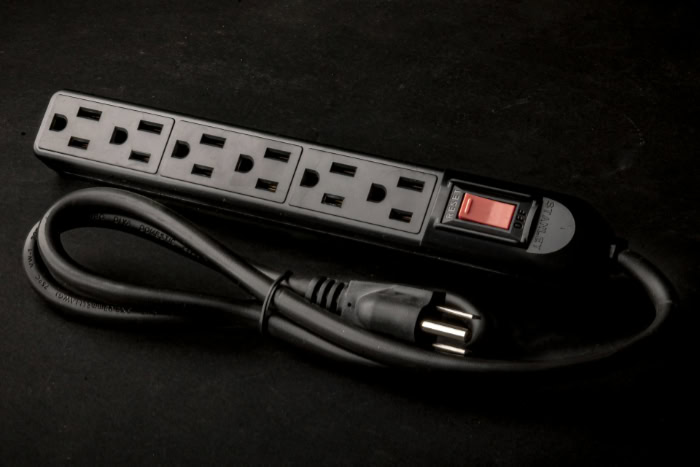
Equipment owners frequently confuse uninterruptible power supplies with other electrical protection and backup devices. Understanding how a UPS differs from basic surge strips, fuel generators, and portable battery banks ensures proper hardware deployment.
Distinct Roles: UPS Versus Surge Protectors
A standard surge protector strip resembles a UPS in external appearance, but its internal mechanics are entirely different. Surge strips use metal oxide varistors to absorb or divert sudden voltage spikes caused by lightning or grid switching.
However, they contain no internal energy storage.
When a blackout or severe brownout strikes, a surge protector drops power immediately. It cannot keep a desktop computer running, nor can it provide the seconds required to save an active spreadsheet.
A UPS includes dedicated surge suppression circuitry alongside its battery system, combining voltage clamping with active backup electricity to prevent sudden hardware shutdowns.
Distinct Roles: UPS Versus Fuel-Powered Generators
Fuel-powered generators run on gasoline, diesel, or propane to provide continuous electricity during extended multi-day outages. While a generator produces abundant power, it suffers from an unavoidable mechanical startup lag.
An automatic standby generator requires anywhere from 10 to 30 seconds to detect an outage, crank the engine, stabilize output frequency, and transfer the electrical load.
A UPS complements a generator by bridging this startup gap. The UPS instantly carries the electronics on battery power for the initial 30 seconds of an outage, preventing desktop resets and server crashes.
Once the generator reaches full speed and supplies stable electricity, the UPS transfers back to generator current and recharges its battery while the generator powers the facility.
Distinct Roles: UPS Versus Portable Power Stations
Portable power stations, commonly marketed for camping or outdoor recreation, feature large-capacity lithium batteries and built-in AC outlets. Despite their external similarities to a UPS, their internal electronics serve different operational priorities.
Portable power stations focus on energy volume rather than instantaneous power transfer.
Most portable power stations lack the specialized high-speed transfer switches found in desktop backup units. Their internal switching mechanisms often require 30ms or more to engage, or they demand manual button activation.
Switching delays of 30ms are far too slow for personal computers, causing the power supply capacitors to deplete and the operating system to shut down. Dedicated desktop UPS systems prioritize rapid sub-10ms response times over portable storage capacity.
Protection Advantages and Common Applications

Deploying a battery backup system delivers critical stability to residential and commercial environments. The hardware shields sensitive computer electronics from utility inconsistencies while maintaining daily operational continuity.
Prevention of Data Loss and File Corruption
Sudden power cuts represent one of the primary causes of storage drive failure and operating system corruption. Modern operating systems constantly cache temporary data, update registries, and write background system logs.
When electricity terminates mid-write, disk heads can write incomplete data blocks, resulting in unreadable files or broken operating system partitions.
Most UPS units include a data communication port, such as a USB or serial connection, that plugs into the host computer. Management software running on the operating system tracks battery percentage and utility status.
If an outage occurs while the workstation is unattended, the software safely saves open projects, commands background applications to close, and initiates a clean shutdown or hibernation procedure before battery levels drop to 0%.
Correction of Line Noise and Voltage Irregularities
Utility electricity rarely flows as an entirely smooth, consistent current. Grid switching, nearby industrial machinery, and household appliance cycles introduce electrical line noise, voltage sags, brownouts, and frequency shifts.
These recurring irregularities place chronic thermal and electrical stress on computer motherboards, capacitors, and internal power supply units.
A quality UPS cleanses incoming electricity before passing it to connected hardware. Line-interactive and online double-conversion units stabilize fluctuating voltages and filter electromagnetic interference and radio frequency interference.
By preventing internal computer components from absorbing continuous electrical shocks and voltage dips, the UPS extends the operational life and reliability of desktop equipment.
Common Use Cases in Homes and Workplaces
Battery backup hardware serves numerous practical roles across residential, commercial, and industrial settings. In home telecommuting offices, a modest UPS keeps Wi-Fi routers, broadband modems, and desktop computers online through rolling outages, ensuring remote workers stay connected during business calls.
For media creators and small businesses, a UPS protects Network Attached Storage (NAS) multi-drive arrays. Abrupt power losses across an array can corrupt volume metadata, triggering hours of risky drive rebuilding that risks complete data loss.
In retail and security environments, battery backups maintain uninterrupted operation for point-of-sale registers, payment terminals, video surveillance systems, and electronic door locks, keeping commerce and physical security active during power failures.
Purchase Criteria and Battery Maintenance
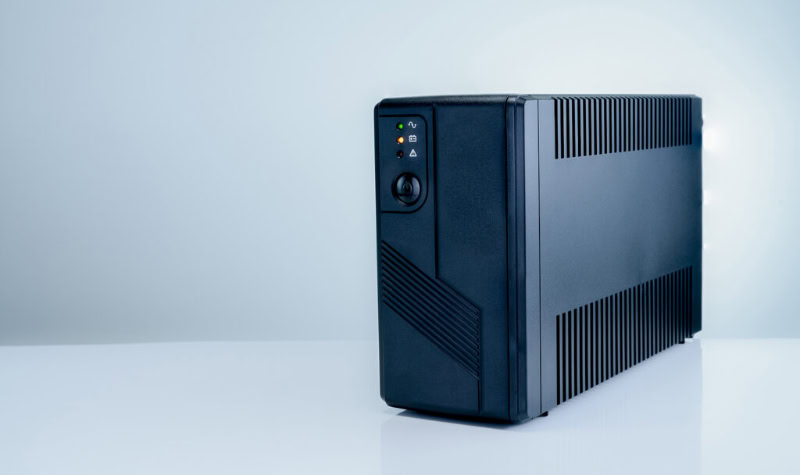
Selecting the appropriate backup unit requires balancing electrical capacity with runtimes and waveform compatibility. Ongoing battery maintenance ensures the system performs reliably when power failures strike.
Capacity Assessment: Watts and Volt-Amperes
UPS manufacturers display capacity using two distinct ratings: Volt-Amperes (VA) and Watts (W). Volt-Amperes represent apparent power, which is the total voltage multiplied by current.
Watts represent real power, which accounts for the efficiency of connected computing electronics. Because of internal power factors, a UPS rated at 1500VA typically delivers around 900W to 1000W of real power.
To size a system correctly, calculate the power consumption of all devices intended for connection. A desktop computer drawing 350W, paired with a monitor drawing 40W and network gear drawing 30W, totals 420W of demand.
Add a safety buffer of 20% to 25% to accommodate power spikes and future expansions. For this 420W load, selecting a unit rated for at least 525W ensures adequate headroom.
Buyers must also distinguish between basic shutdown runtime and extended operational runtime. A standard desktop unit provides between 5 and 10 minutes of runtime at half load, which is sufficient for safe software closure.
Sustaining operations for 2 hours requires specialized external battery packs or higher-capacity chassis designs.
Output Waveform Options: Pure Versus Simulated Sine Wave
Standard utility wall outlets deliver alternating current in a smooth, continuous pure sine wave. Low-cost standby and line-interactive UPS units often produce a simulated or stepped sine wave on battery power, which approximates utility AC using blocky, stair-step electrical pulses.
While basic electronics and laptop power bricks tolerate simulated waveforms, modern performance computers feature power supplies with Active Power Factor Correction (Active PFC). When an Active PFC power supply encounters a simulated sine wave, the sharp stepped corners can cause the power supply to buzz loudly, overheat, or shut down entirely.
High-performance gaming rigs, creative workstations, and NAS appliances should always be paired with a UPS that outputs a pure sine wave to ensure hardware stability.
Battery Service Life and Routine Replacement
Internal batteries represent the consumable portion of any UPS system. Traditional Sealed Lead-Acid (SLA) batteries carry an average operational lifespan of 3 to 5 years under moderate indoor temperatures.
Modern Lithium-ion battery packs last substantially longer, frequently operating reliably for 8 to 10 years before requiring service.
UPS units execute automatic self-tests every 14 days. When an internal battery degrades, the unit signals the problem through visual warning icons, software notifications, or audible beeping patterns.
Physical inspection may also reveal battery housing swelling or excessive casing heat.
When replacing a battery, power down the unit, unplug it from the wall, and follow the manufacturer instructions for swapping internal modules. To protect the inverter from catastrophic overload, never connect high-draw heating appliances to battery-backed outlets.
Laser printers, space heaters, paper shredders, and hair dryers pull large initial current surges that will trip UPS circuit breakers and drain battery reserves within seconds.
Conclusion
An uninterruptible power supply serves as far more than an emergency battery during a blackout. By continuously filtering line noise, correcting irregular voltage sags, and bridging the gap when municipal power fails, the device acts as a primary guardian for sensitive electronics and critical files.
Protecting desktop workstations, home networks, and storage arrays requires balancing electrical capacity with the proper system architecture. Pairing the right wattage and waveform with routine battery replacements creates a stable operating environment, preventing sudden hardware damage and ensuring your daily work continues without interruption.
Frequently Asked Questions
Can I plug a laser printer into a UPS?
No, you should never plug a laser printer into the battery backup outlets of a UPS. Laser printers require sudden, massive bursts of electrical current when warming up their heating elements. This heavy draw easily overloads the inverter, triggering warning alarms, tripping internal breakers, and instantly cutting power to your computer.
How long will a UPS keep my computer running during a power outage?
A standard desktop UPS typically provides between 5 and 10 minutes of battery runtime under a moderate electrical load. This window provides enough time to save open documents, exit running programs, and power down your computer safely. If you require hours of continuous runtime, you must purchase a larger system with external expansion batteries.
What is the difference between a surge protector and a UPS?
A surge protector only guards against sudden voltage spikes, whereas a UPS includes a battery to keep devices running during power outages. Surge strips pass electricity straight through without storing backup energy. When wall power cuts out, a surge strip immediately drops offline, while a UPS automatically supplies battery power to prevent shutdowns.
How often do I need to replace the battery in a UPS?
Most standard sealed lead-acid UPS batteries require replacement every 3 to 5 years. Operating conditions, such as high ambient room temperatures and frequent power outages, can shorten this lifespan. The unit will alert you when service is due through recurring audible beeps, flashing warning indicators, or automated diagnostic system self-tests.
Do I need a pure sine wave UPS for my gaming computer?
Yes, you should choose a pure sine wave UPS for a modern gaming computer. Gaming PCs use power supplies with Active Power Factor Correction, which requires smooth utility-grade electricity to run properly. Simulated sine wave units produce choppy electrical steps that can cause sensitive gaming power supplies to hum loudly, shut down, or crash.
About the Author: Elizabeth Baker


