
AMD Ryzen 9 vs. Intel Core i9: Which Should You Buy?

Investing in a flagship processor is one of the most expensive and consequential decisions you can make for your PC, directly impacting your rendering speeds, frame rates, and daily workflow. Because AMD and Intel have taken drastically different paths to achieve peak performance, picking the wrong architecture can lead to buyer’s remorse and wasted budget.
The AMD Ryzen 9 and Intel Core i9 platforms represent the pinnacle of desktop computing, each fighting for dominance through contrasting engineering philosophies. One relies on a uniform, cache-heavy design, while the other utilizes a hybrid core layout to balance efficiency and raw power.
Key Takeaways
- AMD Ryzen 9 processors with 3D V-Cache deliver higher and more consistent frame rates in CPU-bound games because the stacked on-die memory minimizes data-fetching delays from system RAM.
- Intel Core i9 processors require robust liquid cooling solutions and high-wattage power supplies due to peak power draws that can exceed 250 to 300 watts, whereas Ryzen 9 chips operate with lower thermal output under 200 watts.
- Choosing AMD’s AM5 platform offers a longer upgrade path because AMD supports its socket across multiple processor generations, whereas Intel motherboards generally require a full replacement after two CPU generations.
- Intel Core i9 processors provide faster timeline playback and video exports in software like Premiere Pro because of dedicated hardware acceleration blocks from Intel Quick Sync.
- Intel relies on a hybrid core design managed by hardware-based thread scheduling to balance background tasks and gaming, whereas AMD uses symmetrical high-performance cores to provide predictable execution scaling.
Processor Architecture and Core Design
The fundamental layout of a CPU dictates how it processes instructions, manages system resources, and handles multi-threaded operations. While both chipmakers aim to deliver maximum speed, their modern designs reflect diverging approaches to processor architecture and silicon layout.
Symmetrical Core Configuration of AMD Ryzen 9
AMD built its high-end desktop platform around a symmetrical chiplet architecture. Instead of placing all processing units on a single, massive piece of silicon, AMD uses smaller Core Complex Dies (CCDs) connected to a central I/O die.
In Ryzen 9 processors, this setup typically pairs two CCDs, each containing up to eight identical, high-performance cores. Every core operates at the same baseline capabilities and shares the same instruction set architecture.
Because these cores are uniform, operating systems can distribute workloads across any available thread without worrying about scheduling penalties or performance mismatches. However, the physical separation of the cores onto different CCDs introduces a minor latency penalty.
When a thread on the first chiplet needs to communicate with a thread on the second, data must travel through the Infinity Fabric interconnect via the central I/O die. While this communication latency is minimal, it can occasionally affect latency-sensitive applications if the software is not optimized to keep related threads on a single CCD.
Hybrid Core Architecture of Intel Core i9
Intel took a completely different path with its desktop flagships, adopting a hybrid core design. This architecture splits the processor into two distinct types of silicon units: Performance-cores (P-cores) and Efficiency-cores (E-cores).
The P-cores are large, powerful, and designed to handle demanding, low-latency, or single-threaded tasks. They support hyper-threading, allowing each core to run two software threads simultaneously.
The E-cores are physically smaller, lack hyper-threading, and are optimized for power-efficient multi-threaded scaling and background operation management.
To prevent the operating system from sending critical, high-priority tasks to the slower efficiency cores, Intel built a hardware-level coordination engine called Intel Thread Director. This technology works directly with the Windows operating system to monitor execution telemetry in real-time, matching each software instruction to the most appropriate core type.
For example, a heavy game loop runs on the P-cores, while background applications like chat clients or web browsers are shifted to the E-cores. While highly effective, this hybrid setup relies heavily on software-level optimization, meaning older operating systems or poorly optimized apps can occasionally experience scheduling errors.
Cache Structure and the Impact of 3D V-Cache
Cache memory serves as the ultra-fast storage buffer directly on the processor, reducing the frequency with which the CPU must fetch data from the much slower system RAM. Intel’s Core i9 processors utilize a traditional cache structure, assigning a modest amount of dedicated L2 cache to each core and sharing a larger pool of L3 Smart Cache across the entire chip.
AMD’s standard Ryzen 9 processors offer larger L3 cache pools by default, but the company’s 3D V-Cache technology takes this a step further. By physically stacking an extra 3D-stacked silicon die directly on top of one of the CCDs, AMD exponentially increases the L3 cache capacity.
This massive pool of local memory dramatically reduces computational bottlenecks in applications that process large, repetitive data sets. Since the processor can store almost all critical assets directly on-die, it rarely has to wait for system memory, which yields massive gains in execution speeds for complex simulators and frame rate consistency in games.
Performance Metrics in Games and Professional Applications

A processor’s architectural layout directly translates to how it behaves under different workloads. Depending on software reliance on single-threaded frequency or parallelized core scaling, each CPU platform shows distinct operational strengths.
Frame Rates and Game Performance Benchmarks
In modern gaming, the choice of CPU becomes highly visible depending on the target resolution and engine type. At a standard 1080p resolution, the system is highly CPU-bound, meaning the speed of the processor directly dictates the maximum frame rate.
Here, AMD’s stacked cache technology often pulls ahead, delivering exceptionally high average frame rates and much smoother frame times. As resolutions scale up to 1440p and 4K, the workload shifts heavily to the graphics card, narrowing the performance gap between the two processors, though the physical simulation speeds remain tied to CPU throughput.
Different game engines also utilize these processors in unique ways. Simulation-heavy titles that compute complex physics, artificial intelligence pathfinding, and massive unit counts benefit greatly from the uniform, high-clocked cores of the Ryzen 9.
Conversely, engines that do not scale well past eight cores but require high clock speeds perform exceptionally well on the ultra-high boost frequencies of Intel’s P-cores.
Content Creation and Software Export Speed
Professional content creation software demands a balance of high-speed single-core throughput and massive multi-threaded parallel processing. In rendering engines like Blender or Cinema 4D, the Ryzen 9 platform scales exceptionally well due to its sixteen identical, high-performance cores, completing long-duration rendering tasks with highly predictable execution times.
Every core operates at full power, meaning there are no slower efficiency cores dragging down the rendering pipeline.
For video editing, Intel’s Core i9 has a distinct hardware advantage in software like Adobe Premiere Pro and DaVinci Resolve. Many Core i9 chips feature an integrated graphics engine equipped with Intel Quick Sync.
This dedicated hardware acceleration block handles video encoding and decoding on the fly, allowing for smooth timeline scrubbing, fluid multi-cam playback, and significantly faster export speeds. While AMD processors can brute-force these exports using raw core power, they lack the specific, dedicated hardware block that matches Quick Sync’s specific media processing efficiency.
System Responsiveness and Single-Thread Benchmarks
Synthetic benchmarks help isolate single-threaded performance, where Intel has historically pushed for maximum possible clock speeds. In tests like Cinebench and Geekbench, Intel’s P-cores often register higher single-threaded scores, which translates to a highly responsive feel in daily tasks.
Launching applications, moving large files, and working with legacy software that only utilizes one or two threads feel instantaneous on the Core i9.
AMD’s Zen architecture matches this snappiness by utilizing rapid boost clocks of its own, though it relies more on architectural efficiency per clock cycle rather than raw frequency scaling. For everyday multitasking, both platforms offer more than enough performance, but Intel’s hybrid architecture ensures that background downloads, system updates, and browser tabs remain entirely separated from your active workspace, preventing system lag.
Power Efficiency and Thermal Characteristics

Running high-performance silicon requires a significant amount of electricity, which in turn generates substantial heat. Managing the balance between power draw and thermal dissipation is critical for system stability and noise levels.
Power Consumption Under Peak Load
Power draw is one of the most prominent points of divergence between these two platforms. Under heavy multi-threaded workloads, Intel’s Core i9 processors can draw well over 250 to 300 watts of power during their turbo boost phases, far exceeding their baseline Thermal Design Power (TDP) ratings.
This aggressive power consumption allows Intel to maintain its high boost frequencies across all P-cores, but it places a massive demand on the system’s power supply unit.
AMD’s Ryzen 9 chips are engineered with a focus on strict power limits. Under full load, a top-tier Ryzen 9 rarely exceeds 200 watts, presenting a much lower energy profile.
When idling or performing low-load tasks like document editing or playing video, both platforms behave efficiently, though AMD’s chiplet design occasionally exhibits slightly higher idle power consumption due to the active Infinity Fabric interconnect linking the separate dies.
Thermal Limits and Thermal Dissipation
Due to the high power draw, keeping these processors cool is a major consideration. Intel’s Core i9 processors are designed to run right up to their default thermal junction maximum (TJMax) of 100 degrees Celsius under load, utilizing every bit of thermal headroom before thermal throttling occurs.
To keep a Core i9 from throttling during heavy rendering, a high-performance 360mm or 420mm liquid All-In-One (AIO) cooler is practically mandatory.
AMD’s Ryzen 9 chips also target high operating temperatures by design, often resting at 95 degrees Celsius during intense workloads. This is normal behavior, as the system dynamically boosts clock speeds until it hits this thermal ceiling.
However, because the total thermal energy produced by the Ryzen 9 is lower, it can be easily managed with a high-end dual-tower air cooler, though liquid cooling still provides the best overall performance and quieter operation.
Efficiency and Performance-per-Watt Ratios
When measuring efficiency as the amount of computational work completed per unit of power consumed, AMD’s architecture holds a distinct lead. During long-duration rendering or compilation tasks, the Ryzen 9 completes the job using fewer total watt-hours of electricity.
This lower power-to-work ratio means the system runs cooler over long periods, reducing the heat output released into your room.
Intel’s hybrid design works well for short burst tasks, where the efficiency cores can quickly handle minor calculations without spinning up the power-hungry P-cores. However, during sustained, heavy processing, the high power requirements of the P-cores degrade the overall performance-per-watt ratio, making Intel the less efficient choice for continuous, heavy production workloads.
Motherboard Ecosystem and Platform Longevity
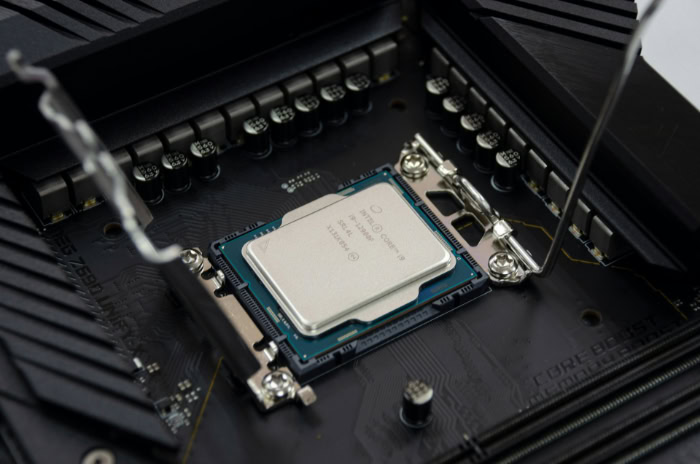
Choosing a processor also means committing to a specific motherboard socket and platform ecosystem, which defines your potential upgrade path and connectivity options for years.
Socket Compatibility and Long-Term Upgrade Paths
AMD’s AM5 platform is designed with long-term compatibility in mind. AMD has committed to supporting the AM5 socket for multiple processor generations, allowing users to purchase a motherboard today and swap in a newer CPU years down the line without replacing the board or memory.
This follows the highly successful precedent set by their previous AM4 socket, which received updates for over six years.
Intel’s platform upgrade cycles are much shorter and more rigid. Typically, an Intel motherboard socket only supports two generations of processors before being retired.
Users purchasing a high-end Intel motherboard must expect to buy a new motherboard if they want to upgrade to a newer CPU generation in the future, increasing the long-term cost of staying on the cutting edge.
PCIe Lane Allocation and Connectivity Standards
Both platforms offer excellent support for modern peripheral standards, but their lane configurations differ. Both AMD and Intel motherboards provide PCIe Gen 5 support for the primary graphics slot and high-speed M.2 NVMe solid-state drives.
However, AMD’s chipsets often allocate more dedicated Gen 5 lanes directly from the processor, allowing you to run multiple high-speed storage drives simultaneously without splitting bandwidth away from your graphics card.
Regarding external connectivity, Intel platforms natively integrate Thunderbolt 4, offering incredibly high bandwidth for external storage, docks, and high-resolution displays. AMD motherboards counter this by offering native USB4 support, which is functionally compatible with Thunderbolt devices.
High-speed networking, including 2.5 Gbps or 10 Gbps Ethernet and modern Wi-Fi standards, is readily available on high-end motherboards for both processors.
Memory Performance and System Boot Behavior
Both processor families require DDR5 memory, but they handle memory profiles and system boot times differently. Intel supports Extreme Memory Profile (XMP) technology, which has mature stability and handles extremely high memory speeds with relative ease.
System boot times on Intel platforms are typically quick and consistent, as the memory controller requires minimal training time to stabilize the RAM.
AMD utilizes Extended Profiles for Overclocking (EXPO) to manage memory speeds. While EXPO has become highly stable, AMD platforms often require longer system boot times, particularly during the first few startups or after BIOS updates.
This is due to an extended memory training process where the motherboard tests and optimizes memory timings to ensure system stability. Newer motherboard BIOS updates have mitigated this delay, but Intel still retains a slight edge in boot-time consistency.
Total Cost of Ownership and Value Analysis

The final purchase decision rarely comes down to performance alone; the overall financial investment required to build and run the system plays a major role.
Retail Price Points and Hardware Availability
At retail, flagship AMD Ryzen 9 and Intel Core i9 processors are positioned competitively, though prices fluctuate based on market demand and supply stability. AMD’s Ryzen 9 chips occasionally command a premium, especially the models equipped with 3D V-Cache, due to high demand from the enthusiast gaming community.
Intel’s Core i9 processors are widely available and frequently see retail discounts, making them highly attractive to builders looking for raw power at a slightly lower initial purchase price.
Auxiliary Component Costs
To accurately calculate the total cost of ownership, you must look beyond the price of the CPU itself. Because AMD’s AM5 motherboards feature complex power delivery systems and advanced trace routing for PCIe Gen 5, mid-range and high-end AM5 motherboards are often more expensive than equivalent Intel options.
However, Intel systems claw back this cost differential due to their cooling and power requirements. A Core i9 system requires a significantly larger budget allocation for a high-wattage power supply unit to handle sudden power spikes.
Additionally, you must invest in an expensive, high-end liquid cooling solution, whereas an AMD build can run efficiently on a less expensive air cooler or a modest liquid setup, balancing out the total system build cost.
Return on Investment for Diverse User Profiles
For pure gamers, the return on investment heavily favors AMD’s Ryzen 9 processors, particularly the 3D V-Cache variants. The massive frame rate advantages in modern games justify the slightly higher motherboard costs, providing a superior gaming experience that will remain relevant for years.
For full-time media production professionals who rely on Adobe Premiere Pro or DaVinci Resolve, the Core i9 offers a compelling value proposition. The inclusion of Intel Quick Sync speeds up editing workflows and reduces export wait times, directly translating to higher productivity and a faster return on investment for working professionals, despite the higher utility bills and thermal management requirements.
Quick-Reference
| User Profile | Primary Computing Needs | Recommended Processor Model | Primary Technical Advantage |
| High-Frame-Rate Gamer | Peak frame rates, smooth frame times, and high physics simulation performance in CPU-bound titles. | AMD Ryzen 9 9950X3D (or Ryzen 9 7950X3D) | Stacked 3D V-Cache dramatically reduces memory latency bottlenecks in modern game engines. |
| Professional Video Editor | Fluid timeline scrubbing, responsive multi-cam playback, and fast H.264/H.265 export speeds in Premiere and Resolve. | Intel Core i9-14900K (or Core Ultra 9 285K) | Integrated graphics with Intel Quick Sync provide dedicated hardware-accelerated video decoding. |
| 3D Rendering & Compilation Specialist | Sustained multi-threaded processing in Cinema 4D, Blender, or high-volume code compilation. | AMD Ryzen 9 9950X (or Ryzen 9 9900X) | Symmetrical, uniform high-performance cores maximize heavy computing efficiency with low overall power draw. |
| The Multitasking Power User | Responsive application loading, smooth background file transfers, and everyday system responsiveness. | Intel Core i9-14900K | Hybrid architecture allocates background processes to efficiency cores, keeping foreground apps highly responsive. |
Conclusion
Choosing between the AMD Ryzen 9 and Intel Core i9 comes down to prioritizing your specific computing needs and architectural preferences. AMD offers a uniform, power-efficient, chiplet-based design with massive cache options, making it a compelling option for gaming performance and highly predictable multi-threaded workloads, backed by a platform socket that promises simple future upgrades.
Intel counters with a highly responsive, high-clocked hybrid architecture that excels in daily multitasking responsiveness and specialized video editing acceleration, though it demands more power and cooling to maintain its peak performance. By matching your daily software requirements to these specific hardware designs, you can confidently select the processor platform that will best power your desktop system.
Frequently Asked Questions
Do I need a liquid cooler for an Intel Core i9?
Yes, you generally need a high-performance 360mm or 420mm liquid cooler to keep an Intel Core i9 from thermal throttling. Because these processors can draw over 250 to 300 watts of power under heavy workloads, standard air coolers cannot dissipate the massive heat output quickly enough to maintain maximum boost frequencies.
Which processor is better for editing videos?
Intel Core i9 processors are better for video editing due to their integrated Intel Quick Sync hardware acceleration. This dedicated hardware block handles video encoding and decoding directly, which ensures smooth timeline playback and faster export speeds in software like Adobe Premiere Pro and DaVinci Resolve without relying purely on raw CPU cores.
Will AMD Ryzen 9 motherboards let me upgrade my CPU in the future?
Yes, AMD’s AM5 motherboard socket supports multiple future processor generations, allowing you to upgrade without buying a new board. In contrast, Intel motherboard sockets typically only last for two generations, meaning you will likely need to purchase a new motherboard when you want to upgrade to a newer CPU.
Why are Ryzen 3D V-Cache processors so good for gaming?
AMD’s 3D V-Cache processors excel in gaming because their massive stacked L3 cache significantly reduces the time the CPU spends retrieving data from your system RAM. This local memory boost keeps the gaming engine supplied with critical assets instantly, resulting in exceptionally high frame rates and much smoother overall gameplay.
Can I run background apps while gaming on these CPUs?
Yes, both processors handle background applications easily, though Intel’s hybrid core architecture is specifically optimized for this. Intel’s Thread Director automatically routes background programs like web browsers or chat clients to the efficiency cores, ensuring your heavy game loop runs on the high-performance cores without experiencing any system stutter or lag.
About the Author: Julio Caesar


