
Desktop vs. Mini PC: How to Choose Your Setup

Buying a massive desktop tower today often means paying for empty space you will never use. For many professionals, a device the size of a paperback book now handles heavy spreadsheets and high-definition video just as smoothly as a traditional workstation.
Choosing the wrong size leads to a cluttered desk and wasted money or, conversely, a system that overheats and fails during a critical project. Recent shifts in silicon design have turned the old rules of computing upside down by packing high-end performance into tiny enclosures.
To make the right investment, you must look past the physical dimensions and evaluate how these machines handle the heat and hardware limits of daily life.
Key Takeaways
- Desktop towers offer full hardware customization, allowing users to replace the motherboard, processor, and graphics card as technology improves.
- Mini PCs use mobile-class hardware and integrated graphics, making them great for office work but insufficient for high-end 3D rendering or gaming.
- Small enclosures often lead to thermal throttling, which slows down the processor during long periods of intense activity to prevent overheating.
- Desktops utilize large fans to maintain a low acoustic profile, whereas the tiny fans in mini units can create a high-pitched noise under load.
- A mini unit consumes significantly less electricity, providing a more efficient solution for basic computing and always-on home servers.
Performance and Hardware Architecture
The internal composition of a computer determines how it handles complex calculations and sustained workloads. While both desktops and mini units use similar silicon technology, the way these components are integrated differs significantly.
Desktops generally prioritize raw power by using parts that can pull more electricity and generate more heat. Mini units, by contrast, focus on architectural efficiency to fit as much power as possible into a chassis that might be smaller than a standard power supply.
CPU Power and Processor Variants
Standard desktop towers utilize desktop-class processors designed with high Thermal Design Power (TDP) ratings. These chips can maintain high clock speeds for hours because they are backed by large cooling towers or liquid cooling systems.
Mini units usually rely on mobile-class processors, which are the same chips found in high-end laptops. These processors are optimized to deliver high performance while consuming minimal power.
While they are incredibly fast for short bursts of activity, they often lack the sustained multi-core performance required for heavy data processing or long-form video encoding.
Integrated vs. Dedicated Graphics
A major divide exists in how these systems handle visual data. Most desktops feature a dedicated Graphics Processing Unit (GPU) that sits on its own circuit board with independent cooling and memory.
This allows for smooth frames in high-end gaming and rapid rendering in 3D design software. Most mini units rely on integrated graphics (iGPU) where the visual processing happens on the same chip as the main processor.
While modern integrated graphics are powerful enough for 4K video playback and light photo editing, they cannot compete with the sheer horsepower of a full-sized graphics card.
Thermal Management and Throttling
Heat is the primary enemy of performance in small electronics. Because a mini unit has very little internal air volume, the heat generated by the processor builds up quickly.
When the temperature hits a certain limit, the system automatically slows down the processor to prevent damage, a process known as thermal throttling. A desktop tower avoids this through unrestricted airflow and multiple large fans that move hot air out of the case before it can impact performance.
This allows a desktop to run at maximum speed indefinitely, whereas a mini unit may slow down during the second or third hour of a heavy task.
Spatial Design and Ergonomics
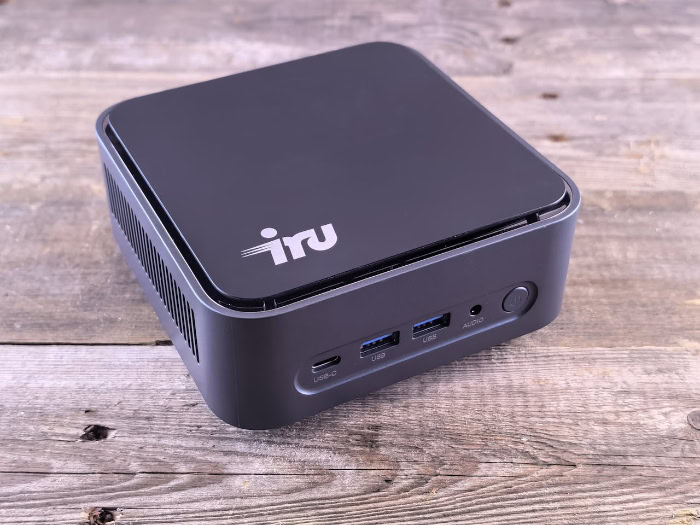
The physical presence of a computer changes how a user interacts with their workspace. A traditional tower is a piece of furniture that demands its own dedicated space, usually under or on top of a desk.
Mini units offer a different philosophy, treating the computer as a discreet utility rather than a focal point. This shift affects everything from the cleanliness of the desk to how easily a user can move their workstation between different locations.
Desk Real Estate and Mounting
A mini unit takes up a fraction of the space required by a tower, often leaving the entire desk surface open for notebooks, large mousepads, or multiple monitors. Many of these small devices are compatible with VESA mounting brackets, which allow the computer to be bolted directly to the back of a monitor.
This setup effectively turns a standard screen into an all-in-one system, completely removing the computer from the desk surface. A desktop tower, even a modern one, requires significant clearance for airflow and cable access, often dictating the layout of the entire room.
Portability and Travel
The mobility of a mini unit is one of its most compelling traits. While not as portable as a laptop because it still requires external peripherals, a mini unit can easily fit into a backpack or briefcase.
This makes it a preferred choice for professionals who move between a home office and a corporate headquarters but want to use the exact same hardware in both spots. A desktop tower is essentially stationary.
Moving one requires careful packing, heavy lifting, and a total teardown of the cable setup, making it a permanent fixture once it is installed.
Cable Management and External Hubs
Internal space in a desktop allows for most cables to be tucked away behind metal panels, resulting in a very clean look despite the massive amount of hardware. Mini units face a different challenge.
Because the chassis is so small, there is no room for internal expansion, forcing users to rely on external drives, docks, and dongles for extra connectivity. This can lead to an “octopus” effect, where a tiny computer is surrounded by a messy web of external wires and power bricks.
Achieving a clean look with a mini unit often requires a deliberate investment in wireless peripherals or specialized cable management tools.
Upgradability and Service Life

The value of a computer is often measured by how long it remains useful before it needs to be replaced. Desktops have historically set the standard for service life because every individual part can be swapped or repaired.
Mini units move toward a more appliance-like model, where the device is optimized for its current state but offers fewer paths for growth. This distinction impacts the total cost of ownership over a five-to-ten-year period.
Internal Component Access
Opening a desktop tower is usually a matter of turning a few thumbscrews to reveal a modular interior. Users can easily replace a motherboard, upgrade a processor, or add more storage drives as their needs change.
Mini units are much more restrictive. While most allow users to upgrade the RAM or the SSD, the processor and graphics hardware are almost always soldered to the motherboard.
This means that if the processor becomes too slow for modern software, the entire unit must be replaced rather than just a single chip.
Maintenance and Standardized Parts
Desktops use standardized parts that are available from hundreds of different manufacturers. If a power supply fails or a fan starts to rattle, a replacement can be bought at a local electronics store and installed in minutes.
Mini units often use proprietary parts, such as custom-shaped cooling fans or external power bricks that are specific to that one model. If a proprietary component fails outside of the warranty period, finding a replacement can be difficult and expensive, sometimes rendering the entire computer useless.
Adapting to Future Hardware Standards
As software becomes more demanding, hardware must keep pace. A desktop provides the physical room to install new technologies that did not exist when the computer was first built, such as faster networking cards or newer USB standards.
The fixed nature of a mini unit means it is stuck with the technology it shipped with. While external ports like Thunderbolt allow for some expansion, they often come with performance penalties and high costs compared to the internal slots found in a traditional tower.
Efficiency and Environmental Impact
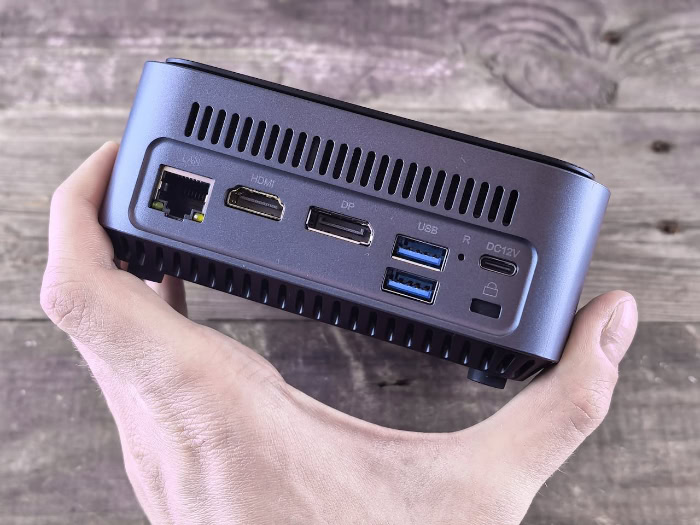
Operating costs and environmental comfort are becoming more important as home offices become more common. The efficiency of a computer affects the electricity bill, the noise level of the room, and even the temperature of the office during the summer.
Mini units and desktops represent two different approaches to power management, with the smaller devices borrowing efficiency strategies from the mobile phone industry.
Power Consumption and Performance-per-Watt
Mini units excel in performance-per-watt metrics. They are designed to do as much work as possible while drawing minimal power, often using less electricity than a single traditional lightbulb when idling.
Desktops are much more power-hungry. A high-end desktop with a dedicated graphics card can pull several hundred watts under load, which adds up over years of daily use.
For businesses deploying hundreds of workstations, the energy savings of switching to mini units can be substantial.
Fan Noise and Acoustic Profiles
The size of the cooling hardware directly influences the sound the computer makes. Desktops use large fans that can move a lot of air while spinning at low speeds, resulting in a low-frequency hum that is easily ignored.
Mini units must use tiny, high-RPM fans to move air through cramped spaces. These small fans often produce a high-pitched whine that can be more distracting, especially when the system is under a heavy workload.
However, during basic tasks like web browsing, many mini units are virtually silent, whereas a desktop always has at least a few fans spinning.
Heat Dissipation and Ambient Temperatures
A high-performance desktop acts like a space heater. In a small room, a tower running a demanding game or a video render can raise the ambient temperature by several degrees within an hour.
This can make the workspace uncomfortable and force the air conditioning to work harder. Mini units generate significantly less ambient heat because they use lower-voltage components.
This makes them much more suitable for small offices, closets, or any environment where heat buildup is a concern.
Value Analysis and Application

The decision between these two form factors often comes down to the specific tasks a user needs to perform and the budget available. There is often a price premium associated with miniaturization, as engineering high-performance parts into a small space requires more precision and specialized materials.
Understanding where the money is going helps in choosing the machine that provides the best return on investment.
The Price-to-Performance Ratio
In terms of pure hardware for the dollar, the desktop tower almost always wins. Because they use standard-sized parts that are produced in massive quantities, desktops do not suffer from the “miniature tax.” A buyer will typically find that a desktop and a mini unit with the same price tag will result in the desktop having a faster processor, more storage, or better graphics capabilities.
The mini unit’s value lies not in its raw speed, but in its saved space and lower power costs.
Identifying the Right Workflows
Mini units are the ideal choice for general office work, web development, home theater setups, and digital signage. They provide more than enough power for these tasks without the bulk of a tower.
On the other hand, professional editors working with 8K video, AAA gamers wanting the highest visual settings, and 3D animators need the thermal headroom and expansion of a desktop. Using a mini unit for these high-intensity tasks often results in frustration due to slower render times and hardware limitations.
The Cost of Peripherals and Expansion
The sticker price of a mini unit can be deceptive. Since these machines lack internal bays, a user who needs a lot of storage will have to buy external hard drive enclosures.
A user who needs more ports will have to buy a powered USB hub or a Thunderbolt dock. These additions not only add to the total cost but also consume the desk space that the mini unit was supposed to save.
A desktop tower includes these expansion options internally, often making it the cheaper and tidier choice for power users who need a complex array of hardware.
Conclusion
Choosing between these two systems depends on identifying which limitation you are willing to live with. A desktop tower provides unparalleled power and the ability to upgrade every single component over time.
This makes it the better choice for high-end gaming or professional media creation. Meanwhile, a mini PC offers a clean workspace and surprising efficiency for everyday office tasks.
If you value a modular system that grows with your needs, the desktop is the logical path. If you need a compact, power-efficient machine for a minimalist setup, the mini unit is the superior option.
Frequently Asked Questions
Is a mini PC as fast as a regular desktop?
A mini PC is fast enough for general productivity, but it usually lags behind a desktop in heavy, sustained workloads. While both can have similar chips, desktops have better cooling and higher power limits that prevent slowdowns. This means a desktop will handle tasks like video rendering much faster.
Can I play high-end games on a mini PC?
You can play most modern games on a mini PC, but you will often need to lower the graphics settings. Most of these tiny units use integrated graphics rather than a separate video card. For the best experience in AAA titles, a desktop with a dedicated GPU remains necessary.
Is it hard to fix a mini PC if it breaks?
Fixing a mini PC is often more difficult because many of its parts are soldered directly to the main board. While you can usually swap the storage or memory, a failed processor or power port might require a total replacement. Standard desktops are much easier to repair with cheap parts.
Does a mini PC use less electricity than a tower?
Mini PCs use significantly less electricity, often consuming only a fraction of the power required by a full-sized tower. They use efficient mobile processors that stay cool and draw very little energy even when busy. This makes them a great choice for keeping your utility bills low over time.
Can I hide a mini PC to save desk space?
Yes, you can easily mount most mini PCs to the back of your monitor using a standard VESA bracket. This setup clears your desk of all hardware and creates a very clean workspace. Many users prefer this over a desktop because it removes all clutter and hides the wires.
About the Author: Julio Caesar


