
What Is a Gaming Laptop? Features, Costs, and Specs

Most personal computers handle basic tasks like streaming media, writing documents, and browsing the web without breaking a sweat. However, certain portable machines look and sound noticeably different, boasting sculpted cooling vents, bold RGB lighting, and hefty price tags.
These systems are gaming laptops, engineered specifically for heavy computational loads that would bring standard office notebooks to a crawl. Everyday shoppers often wonder why these models cost so much more and what truly separates them from basic ultraportable devices.
Key Takeaways
- Dedicated graphics processors with 6GB to 16GB of VRAM provide the computational power required for modern games and professional 3D rendering that integrated graphics cannot support.
- Beyond entertainment, these machines function as mobile workstations capable of running demanding professional software like Blender, Adobe Premiere Pro, and AutoCAD without slowdown.
- Specialized display panels offer high refresh rates of 120Hz to 240Hz and rapid response times of 3 milliseconds, producing fluid motion tracking and accurate color coverage.
- High power consumption leads to significant trade-offs, including battery runtimes of only 60 to 90 minutes under load, heavier builds around 5 lbs (2.3 kg), and audible fan noise.
- Internal processors and graphics chips are soldered directly to the circuit board, meaning buyers cannot upgrade their core hardware components over time.
Definition and Primary Architecture
Understanding modern portable computing requires looking beneath the surface of specialized hardware. A gaming laptop bridges the gap between stationary desktop performance and portable convenience, providing heavy-duty computing power within a foldable design.
The Core Concept: A High-Performance Portable System
At a fundamental level, a gaming laptop is an all-in-one computer engineered to handle modern three-dimensional software and fast-moving visual media. While regular portable machines prioritize battery savings and thin profiles, gaming models pack high-voltage processing units, sophisticated cooling gear, and dedicated graphical silicon into a unified clamshell frame.
This architecture enables users to transport desktop-grade computational capability in a backpack, running modern games and complex mathematical calculations wherever an electrical outlet is available.
Contrast with Standard Everyday Laptops
Standard office laptops and ultrabooks focus heavily on slim dimensions, silent operation, and long battery life. In contrast, gaming laptops feature noticeably thicker frames designed to house massive copper heatsinks and multiple exhaust channels.
Their exterior styling often includes prominent ventilation grilles, distinctive angular edges, and customizable colored lighting across the keyboard deck. While an ultrabook might weigh under 3 lbs (1.4 kg) and measure less than half an inch thick, a gaming portable typically weighs 5 lbs (2.3 kg) or more to accommodate its robust internal cooling apparatus.
Intended Audience and Primary Use Scenarios
Although designed with video game enthusiasts in mind, these versatile machines serve a wide range of demanding users. Media creators, video editors, 3D animators, engineering students running simulation suites, and software developers routinely choose gaming hardware for their daily work.
Programs like Blender, Adobe Premiere Pro, and AutoCAD demand the exact same graphical acceleration and multi-threaded processing power that modern video games require, making these systems highly capable mobile workstations.
Essential Hardware Components

The distinction between a standard laptop and a gaming model lies entirely within the physical components beneath the casing. Each internal part is chosen to balance high power consumption against the physical constraints of a portable chassis.
Dedicated Graphics Processors vs. Integrated Units
The defining component of any gaming machine is its dedicated graphics processing unit, commonly known as a GPU. Standard laptops rely on integrated graphics, where visual rendering shares processing silicon and system memory with the main processor.
Integrated setups handle web browsing, office spreadsheets, and 4K video playback effortlessly, but they buckle under the weight of modern three-dimensional rendering. A dedicated GPU operates as an independent processor with its own high-speed video memory, ranging from 6GB to 16GB of VRAM.
This isolated architecture enables the system to calculate millions of polygons, realistic lighting effects, and intricate physics simulations simultaneously without slowing down the rest of the machine.
Central Processors and High-Speed System Memory
Working alongside the graphics chip is a multi-core central processing unit, or CPU. Modern gaming laptops feature processors with eight or more computing cores capable of reaching clock speeds above 4.5 GHz.
These processors coordinate game logic, background operations, and system physics. To keep the CPU and GPU fed with data, these systems include high-speed system memory, usually starting at 16GB of DDR5 RAM, with premium configurations offering 32GB or 64GB.
Fast solid-state storage, utilizing the PCIe 4.0 or PCIe 5.0 standard, ensures that massive game installations and multi-gigabyte project files load in just a few seconds.
Thermal Management and Heat Dissipation Systems
High-performance processors generate intense thermal energy that must escape the chassis immediately. To achieve this, manufacturers install complex cooling loops consisting of flattened copper heat pipes, liquid metal thermal compound, or sealed vapor chambers that draw heat away from the silicon chips.
Two or more high-velocity fans then push that thermal energy outward through dense copper fins and wide exhaust ports located on the sides and rear of the chassis. Continuous airflow prevents the internal components from reaching excessive temperatures, which would otherwise force the hardware to reduce its operating speed to protect itself.
Display Panels and High-Speed Refresh Rates
A high-powered internal engine requires an equally capable display to showcase its output. While standard business laptops feature panels locked at 60Hz, gaming screens offer refresh rates of 120Hz, 144Hz, 240Hz, or even higher.
A higher refresh rate means the display draws dozens more images per second, resulting in exceptionally smooth motion tracking during fast action sequences. Furthermore, these panels prioritize rapid pixel response times, often rated at 3 milliseconds or lower, preventing visual ghosting and motion blur.
Many configurations also provide high color accuracy, covering 100% of the sRGB or DCI-P3 color spectrum, which benefits digital artists and competitive gamers alike.
Key Advantages and Practical Versatility

Investing in specialized hardware delivers practical utility that extends far beyond entertainment. The combination of intense graphical processing and efficient cooling transforms these portable computers into flexible powerhouses capable of tackling demanding workloads anywhere.
Superior Performance for Heavy Software Tasks
The primary benefit of a gaming laptop is raw computing throughput. Demanding video games run with rich visual fidelity, realistic shadow rendering, and high frame rates that stay smooth during chaotic action.
Outside of gaming, this vast hardware headroom prevents system lag when running intensive background tasks. A user can render a complex video project in the background while keeping 30 browser tabs, communication apps, and spreadsheets open without experiencing stutter, freezing, or sluggish system responses.
Multi-Role Utility for Creative Work and Office Productivity
Because gaming hardware matches the technical specifications needed for commercial content creation, a single machine functions effectively as both an entertainment center and a mobile workstation. Video editors can scrub through multi-stream 4K footage without dropping frames, while 3D artists render complex polygon models in programs like Maya or Cinema 4D.
Architects and engineers can draft detailed schematics in CAD software, and software developers can compile massive codebases quickly. Instead of purchasing two separate computers for work and recreation, one high-performance machine handles both roles seamlessly.
Mobility in Comparison to Traditional Desktop Rigs
Compared to a stationary desktop computer, a gaming laptop offers complete mobility in a self-contained package. A desktop setup requires a separate computer tower, standalone monitor, external keyboard, mouse, and a web camera, tethering the user to a single desk.
A gaming notebook integrates every single one of those elements into a folding body that fits inside a standard travel bag. This portability allows college students, traveling professionals, and digital nomads to transport an entire high-powered workspace between home, school, corporate offices, and hotel rooms.
Technical Trade-Offs and Hardware Limitations
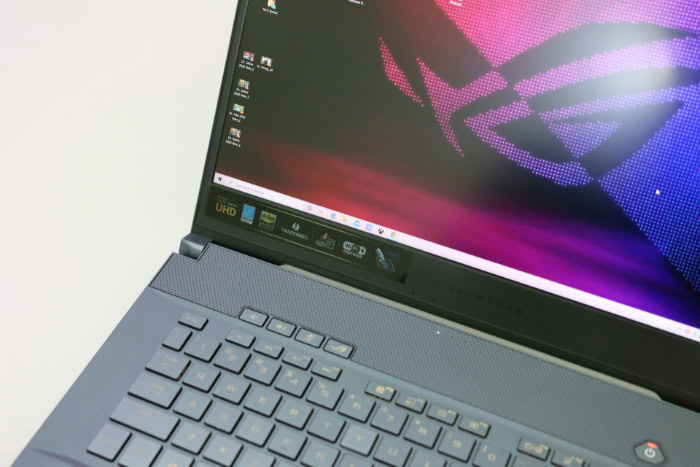
Condensing immense desktop power into a portable clamshell chassis requires notable engineering trade-offs. Prospective buyers must balance the benefits of high-speed performance against several unavoidable physical limitations and daily operational realities.
Short Battery Endurance and High Power Demands
High-wattage components drain battery reserves at an exceptional pace. While a low-power office laptop might easily operate for 10 to 14 hours away from a wall socket, a gaming laptop running a demanding application can deplete its battery in just 60 to 90 minutes.
Even during light tasks like web browsing or text processing, battery endurance typically caps out around four to five hours. Furthermore, internal batteries cannot supply the 100 to 300 watts of electrical power required by high-end GPUs and CPUs to operate at maximum speed.
As a result, the laptop must remain plugged into a wall outlet to deliver its full performance potential.
Physical Bulk and Heavy Power Adapters
Effective thermal management requires thick copper heatsinks and expansive internal air chambers, making gaming laptops considerably bulkier than their lightweight counterparts. Many models measure over 0.8 inches thick and weigh between 4.5 lbs (2.0 kg) and 7 lbs (3.2 kg).
In addition to the weight of the laptop itself, users must transport a substantial external power adapter. These heavy power bricks, often delivering 240W to 330W, can add another 1.5 lbs (0.7 kg) to 2.5 lbs (1.1 kg) to a backpack, significantly increasing the total travel burden.
Fan Acoustics and High Surface Temperatures
Cooling powerful processors within a compact chassis requires miniature fans to spin at speeds exceeding 4,000 RPM. Under sustained computational loads, this airflow generates noticeable acoustic noise that sounds like a miniature vacuum cleaner or rushing wind.
In shared environments such as quiet classrooms or libraries, this noise can be distracting to nearby people. Additionally, heat radiates through the chassis materials, leading to elevated temperatures on the bottom panel and parts of the keyboard deck during extended use, making comfortable lap use virtually impossible.
Financial Investment and Limited Component Upgrades
A modern gaming notebook requires a much larger upfront financial commitment than a standard computer, with capable systems typically starting around $800 and reaching well beyond $3,000 for top-tier hardware. Unlike desktop computers, which allow users to replace the graphics card, processor, and motherboard over time, laptops feature components soldered directly onto the circuit board.
While some models permit adding storage drives or extra RAM, the processor and graphics silicon are permanent. Once the internal hardware becomes outdated for newer software, the owner must replace the entire machine.
Evaluation Criteria for Prospective Owners

Selecting the right portable computer requires matching technical specifications with realistic daily routines and financial limits. Evaluating personal computing habits, budget constraints, and physical space ensures that an owner selects the most practical machine for their specific situation.
Assessment of Personal Computer Requirements
The first step in evaluating a prospective purchase is determining if high-intensity hardware is actually necessary. Users who spend their time reading web articles, writing text documents, paying bills, and watching streaming video do not need dedicated graphics chips or multi-fan cooling solutions.
For these casual computing habits, an efficient, lightweight notebook or tablet provides better battery endurance and greater comfort at a fraction of the cost. Conversely, users who run heavy video editing software, compile complex code, create 3D artwork, or regularly play modern graphical games will benefit immediately from the specialized power of a gaming machine.
Budget Tiers and Expected System Capabilities
Gaming laptops fall into three general budget categories, each providing distinct performance profiles:
- Entry-Level ($700 to $1,000): Built with entry-tier graphics processors and plastic frames. These systems run modern games reliably at 1080p resolution on moderate visual settings.
- Mid-Tier ($1,200 to $2,000): Delivers the strongest balance of price and capability. These machines feature powerful graphics chips capable of driving 1440p displays, upgraded cooling assemblies, and sturdier aluminum chassis materials.
- Premium ($2,200 to over $4,000): Configured with top-of-the-line components, vivid 4K or OLED panels, mechanical keyboards, and slim chassis profiles that maximize speed without unnecessary physical bulk.
Comparison Against Desktop Alternatives
Before buying a gaming laptop, prospective owners should also weigh the benefits of a traditional desktop tower. Fixed desktop computers offer superior thermal headroom, quieter operation, and simpler component upgrades for a lower price per unit of performance.
A desktop configuration priced at $1,200 often outperforms a notebook costing the exact same amount because desktop parts are not constrained by tight physical spaces or mobile power limits. However, if space is limited in a small apartment or bedroom, or if computing tasks regularly require travel between multiple locations, the compact, all-in-one nature of a gaming laptop easily outweighs the raw economic efficiency of a desktop tower.
Conclusion
Gaming laptops combine desktop-grade computing power with the portable convenience of a clamshell notebook. By integrating dedicated graphics processing units, multi-core processors, and advanced multi-fan cooling systems, these machines handle intense visual computing, modern gaming, and heavy creative software with fluid responsiveness.
However, packing high performance into a portable frame introduces unavoidable compromises, such as noticeable fan noise, heavier physical builds, soldered components, and short battery endurance away from a wall outlet. Rather than viewing these devices strictly as entertainment luxuries, general consumers should recognize them as versatile, high-powered tools built to handle demanding computational workloads wherever work happens.
Frequently Asked Questions
Can I use a gaming laptop for everyday office work?
Yes, a gaming laptop handles everyday office tasks and web browsing with ease. Because these computers feature powerful processors and ample memory, everyday programs run exceptionally fast. However, their heavier weight and larger power adapters make them less convenient to carry around than standard ultrabooks, and their internal fans may occasionally spin up during use.
Why do gaming laptops have such short battery life?
High-performance processors and dedicated graphics chips consume enormous amounts of electrical power. Standard laptops use energy-efficient parts designed to last all day, but gaming hardware prioritizes raw processing speed. Consequently, internal batteries deplete rapidly, often lasting only 60 to 90 minutes under heavy computational loads or four to five hours during simple browsing.
Why do gaming laptops get so hot and loud?
High-powered components generate intense heat inside a tight space, requiring high-speed cooling fans to dissipate it. When demanding software pushes the graphics card and processor, miniature fans must spin at thousands of revolutions per minute to exhaust hot air. This creates rushing airflow noise and warms the outer casing, which is normal for high-performance mobile systems.
Can I upgrade the internal parts of a gaming laptop later?
You can usually upgrade the storage drive and system memory, but not the processor or graphics card. Most manufacturers solder the central processor and graphics chip directly onto the circuit board to save physical space. While some laptops provide slots to add extra solid-state drives or RAM, replacing the main processing hardware requires purchasing a new machine.
Is a gaming laptop better than a regular desktop computer?
A gaming laptop is better for portability, but a desktop computer delivers superior performance per dollar. Desktops run cooler, operate more quietly, and allow modular part upgrades over time. However, a gaming laptop combines a monitor, keyboard, and high-performance hardware into a single portable package, making it ideal for frequent travelers.
About the Author: Julio Caesar


