
CPU vs. GPU: Which One Matters Most?
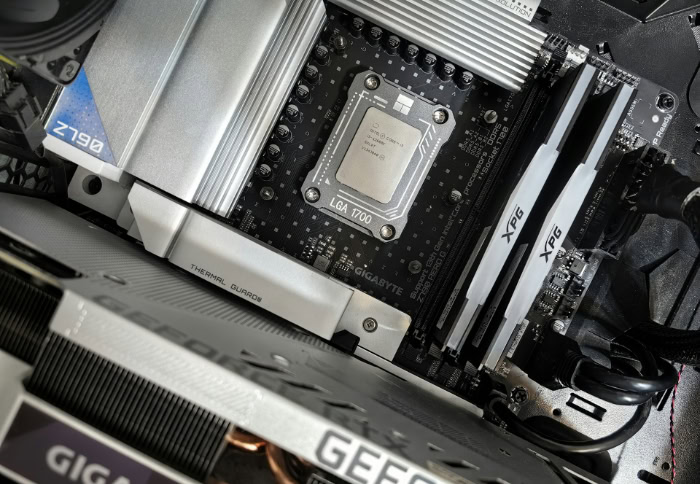
Upgrading a computer involves spending significant money, and selecting the wrong hardware often leads to frustrating slowdowns. Knowing how your central processing unit (CPU) and graphics processing unit (GPU) handle daily tasks guarantees you get the smooth performance you expect.
Many people assume these two primary components compete against one another, but they actually function as a highly complementary team. While CPUs are engineered for low-latency, complex sequential operations, GPUs excel at high-throughput, parallel data processing, making hardware selection heavily dependent on specific computational requirements.
Seeing exactly how these processors divide and conquer different workloads will help you confidently build or buy the perfect machine for demanding games, professional media creation, or basic daily office work.
Key Takeaways
- Central processors prioritize low-latency sequential operations by utilizing complex cores and large caches to handle unpredictable system logic and general applications quickly.
- Graphics processors leverage thousands of smaller cores to execute massive parallel calculations, making them highly efficient for matrix mathematics used in heavy rendering and artificial intelligence.
- The motherboard PCIe bus connects both hardware components, requiring efficient software design to minimize communication delays when transferring large datasets between standard system RAM and dedicated Video RAM.
- High-resolution gaming heavily utilizes graphics processing power to render millions of pixels, while lower resolution gaming stresses the central processor to maintain fast physics logic and high frame rates.
- Integrated graphics combine low-power visual processing directly onto the main processor chip for basic productivity, while discrete graphics cards provide the separate memory and massive compute density strictly required for professional workstations.
Fundamental Architecture and Core Design Principles
Hardware design ultimately dictates how different components handle instructions inside your computer. Both central processors and graphics processors contain microscopic circuits that interpret data, but their internal layouts serve completely divergent computing goals.
Recognizing these physical structures explains why each processor excels at extremely specific tasks, dictating how a computer performs under various workloads.
Central Processor Unit Microarchitecture
Central processing units prioritize speed for individual, isolated tasks. The physical layout, or microarchitecture, of a CPU dedicates massive portions of its available silicon area to sophisticated control logic and large memory caches.
This intricate design allows the processor to guess which computing instructions might come next using advanced branch predictors, preparing the necessary calculations ahead of time. By storing relevant data immediately close to the processing cores in large cache structures, the processor drastically reduces the time it takes to complete a single, highly complex instruction.
Because of this intense focus on rapid, sequential execution, engineers design CPU cores to reach very high clock speeds. The processor moves through instructions one by one as fast as physically possible.
This makes it incredibly efficient at handling unpredictable software tasks that require quick, frequent shifts in mathematical logic.
Graphics Processor Unit Microarchitecture
In stark contrast to central processors, a graphics processing unit optimizes for high volume throughput and massive data parallelism. Instead of featuring a small number of highly complex cores, a GPU contains large matrix arrays filled with thousands of smaller, streamlined Arithmetic Logic Units.
These individual units are not designed to handle highly complex, branching logic. Rather, they dedicate their silicon area to Single Instruction, Multiple Data execution pipelines.
This structure means the processor can take one specific mathematical instruction and apply it to thousands of different data points simultaneously. While a CPU uses its physical space for deep memory caches to speed up one specific task, a GPU uses its physical space to pack in as many processing pipelines as possible to handle thousands of simple, repetitive tasks at the exact same time.
Instruction Execution Paradigms: Latency vs. Throughput
The architectural choices between these two hardware components create two distinct execution paradigms. Central processors operate on a strict latency optimization model.
Their primary goal is to minimize the delay between starting and finishing one specific instruction. Conversely, graphics processors operate on a throughput optimization model.
Their primary goal is to maximize the sheer volume of simultaneous operations completed during every single clock cycle, even if one individual operation takes slightly longer from start to finish. This creates an unavoidable trade-off in computer engineering.
You cannot have both maximum flexibility for general computing and maximum efficiency for specialized matrix operations in the same layout. The CPU trades sheer volume for the flexibility to handle complex software logic.
The GPU trades general logic flexibility to achieve massive computational volume for repetitive mathematics.
Differences in Execution and Memory Systems

Beyond their physical processing circuits, these components utilize entirely different methods for managing workloads and accessing data memory. The specific ways they organize software instructions and communicate with system memory define their respective performance limits and operational strengths.
Core Count and Thread Execution Models
Modern central processors typically feature anywhere from four to sixty-four highly powerful processing cores. Each core manages a small number of concurrent execution threads.
Because these threads often contain complex operating system tasks, switching between them takes a considerable amount of time. This context switching overhead severely limits how many simultaneous tasks a central processor can juggle efficiently before slowing down.
Graphics processors, on the other hand, boast thousands of simple cores designed to process massive thread groups in parallel. Instead of managing a few heavy, demanding threads, they manage thousands of lightweight threads.
If one thread group stalls while waiting for fresh data to arrive, the graphics processor instantly swaps to another thread group with virtually zero delay. This rapid switching allows it to keep all thousands of its cores constantly fed with mathematical operations.
Memory Architecture and Bandwidth Capabilities
Execution models directly influence memory requirements. Central processors rely heavily on system memory, specifically DDR4 or DDR5 RAM.
This type of memory offers lower total bandwidth but is highly optimized for rapid, low-latency access across unpredictable system tasks. The processor needs to grab small, random pieces of information instantly.
Graphics processors use Video RAM, such as GDDR6 or High Bandwidth Memory. This memory type prioritizes massive bandwidth to feed continuous data streams and massive matrix transfers directly into the thousands of processing cores.
These two separate components must communicate constantly, but they are physically separated by the motherboard. The PCIe bus connects them, acting as an information highway.
However, PCIe transfer limits naturally restrict how fast huge blocks of data can move between the standard system RAM and the dedicated Video RAM.
Software Frameworks and Parallel Compute Libraries
Software must be specifically written to take advantage of these radically distinct hardware architectures. Central processors benefit from native compilation across almost all general programming languages, including C++, Rust, and Python.
Code written in these standard languages runs sequentially by default, making the central processor the natural and immediate target. Accessing the massive parallel power of a graphics processor requires specialized software acceleration frameworks.
Developers must utilize parallel computing platforms like NVIDIA CUDA, OpenCL, or DirectCompute. These specialized libraries allow software engineers to adapt their code entirely, breaking massive computational problems down into thousands of smaller pieces that the hardware can calculate simultaneously.
Without this highly specific code adaptation, standard software simply cannot leverage the powerful matrix capabilities hidden inside a modern graphics card.
Workload Specialization and Application Domains

The fundamental hardware layouts and memory designs dictate exactly which applications run best on which specific processor. Assigning the right workload to the proper component allows for building efficient computers that handle daily workflows without freezing or crashing.
General System Operations and Complex Logic
Every computer relies on a central processor to manage its core operational foundation. This component handles the operating system kernel execution, manages background system services, and controls file system read and write requests to the storage drives.
General application software heavily relies on complex conditional logic, which strictly requires sequential execution flow. For example, a word processor must register a keystroke before it can display a letter, and it must check spelling only after the full word is typed.
These steps cannot happen out of order. Most productivity tools, web browsers, and administrative applications have severe single-thread performance dependencies.
They require a processor that can rapidly burn through one logic step after another, making the central processor the absolute only viable option for general daily computing tasks.
Artificial Intelligence and Neural Network Acceleration
The massive rise of artificial intelligence heavily depends on processing architectures built for immense computational volume. Deep learning models and large language model inference engines require billions of simultaneous matrix multiplication operations to generate responses.
Central processors simply lack the core count to finish these dense calculations in a reasonable timeframe. Graphics processors accelerate these workloads easily, especially with the inclusion of dedicated hardware acceleration units like Tensor Cores specifically designed for neural network calculations.
In a practical artificial intelligence workflow, the central processor handles the necessary data preparation. It reads files from the storage drive and organizes the datasets into a usable format.
It then passes this structured data to the graphics processor, which churns through the heavy model training and complex matrix math required to produce the final output.
Visual Graphics and Digital Media Production
Digital media production demands massive parallel processing power to draw millions of pixels on a screen. Interactive visual media requires constant geometric rasterization and advanced lighting calculations like ray tracing.
Because a 4K monitor contains over eight million individual pixels, updating the entire screen sixty times per second requires billions of independent color calculations. Graphics processors handle this demand effortlessly.
They also provide direct hardware acceleration for video compression, professional color grading, and 3D frame generation. This domain still requires a perfect balance between the two processors.
The central processor handles the underlying scene assembly, calculating in-game physics, tracking object locations, and managing user inputs. Once the scene is built mathematically, the graphics processor takes over to render the actual visual frames displayed on the monitor.
System Integration and Bottleneck Dynamics

High-performance computing requires both processors to work together smoothly and efficiently. When one component struggles to keep pace with the other, the entire system slows down, creating a bottleneck that severely restricts the overall computer performance.
Task Delegation in Heterogeneous Systems
A modern computer acts as a heterogeneous system where completely different types of processors collaborate constantly. In this collaborative workflow, the central processor acts as the primary system coordinator, while the graphics processor acts as a highly specialized accelerator.
The data pipeline follows a strict, repeating flow. First, the central processor retrieves raw data from the storage drive.
Next, it transfers this necessary data across the motherboard directly to the graphics processor. The graphics processor executes the necessary parallel calculations and then sends the collected results back for display or storage.
This pipeline introduces inherent delays. There is a noticeable efficiency loss resulting from communication latency across the interconnect bridge between the components.
Efficient software must minimize how often data travels back and forth across this bridge to maintain high system speeds.
System Hardware Bottlenecks and Performance Limitations
When the balance of power shifts too far in one direction, system hardware bottlenecks immediately emerge. A CPU bottleneck occurs when the central processor cannot process logic or generate draw calls fast enough to keep the graphics card busy.
This results in GPU starvation, where the highly capable graphics cores sit completely idle waiting for instructions to arrive. Conversely, a GPU bottleneck happens when the graphics engine becomes fully overloaded, typically caused by rendering extremely complex visual effects at elevated display resolutions.
This limits the total frame rate output, even if the central processor has plenty of logic processing power to spare. Computer builders rely heavily on software diagnostics and hardware monitoring tools to measure dynamic utilization.
Tracking these usage percentages helps users identify exactly which component is currently limiting their specific software performance.
Integrated Graphics vs. Discrete Graphics Processors
Consumers can choose exactly how to implement graphics processing based on their specific hardware needs. Integrated graphics units bundle the graphics processing cores directly onto the exact same silicon chip as the central processor.
These integrated solutions offer exceptionally low power consumption and provide a baseline visual output suitable for daily office work and high-definition media playback. However, they must share the slower system RAM with the main processor.
Discrete graphics cards exist as entirely separate hardware components plugged into the motherboard. They feature dedicated video memory, separate power delivery systems, and massive compute density.
Standalone hardware additions are absolutely necessary for heavy 3D rendering, machine learning environments, and highly demanding visual applications. Integrated solutions remain highly suitable for thin, lightweight laptops and basic desktop setups focused strictly on standard productivity.
Hardware Selection and Budget Allocation Strategies

Choosing the correct computer parts requires analyzing the specific software you plan to run. Allocating a budget efficiently means matching hardware capabilities directly to the resolution, memory demands, and mathematical complexity of your daily workloads.
Resource Allocation for Video Game Configurations
Building a system for interactive entertainment relies heavily on display resolution priorities. At lower resolutions like 1080p, the graphics processor easily renders frames, putting the intense pressure on the central processor to generate physics instructions fast enough to maintain high frame rates.
At elevated resolutions like 1440p or 4K, the workload shifts dramatically. The graphics hardware struggles to process millions of extra pixels, making the graphics card the absolute priority for the entire computer budget.
Consumers must follow balanced spending rules to prevent severe component bottlenecks that ruin performance. Buyers also need to evaluate specific hardware feature sets.
Image upscaling support like DLSS or FSR, hardware-level Ray Tracing performance, and total VRAM capacity play massive roles in how well a system handles highly demanding visual software over the coming years.
Component Priorities for Content Creation Workstations
Configuring a fast content creation workstation begins with a thorough application profile assessment. Builders must identify if their primary software is inherently CPU-bound, such as high-bitrate video encoding or timeline execution, or GPU-bound, like advanced 3D modeling and complex visual effects rendering.
Memory threshold requirements demand careful attention during the hardware selection phase. The system RAM and dedicated VRAM capacity must match the media resolution complexity directly.
For example, editing 8K video timelines requires massive memory buffers to prevent the software from crashing. Workstation builders also face a price-to-performance evaluation between professional graphics options and high-end consumer graphics options.
Professional cards offer certified software drivers and massive memory pools for stability, while consumer cards often provide significantly faster raw rendering speeds for a fraction of the total cost.
Hardware Selection for Data Science Systems
Data science and machine learning environments prioritize massive memory capacity and exact mathematical precision. Dataset size considerations strictly dictate the initial hardware purchase requirements.
Massive data preprocessing requires huge amounts of standard system RAM for the central processor, while actual tensor storage during model training heavily depends on the graphics card VRAM limits. Hardware selection also hinges on specific computational precision support.
Different neural networks require specific mathematical formats, meaning the hardware must efficiently calculate FP32, FP16, and INT8 operations to maximize system training speeds. Finally, system architects must evaluate scaling options for future upgrades.
They have to decide between the straightforward reliability of high-tier single-GPU performance and the highly complex, massively scalable multi-GPU configurations required to train immense parameter models in dedicated server environments.
Conclusion
The fundamental differences between these processors dictate how every computer operates. Central processing units provide the low-latency, sequential power required to handle unpredictable system logic and daily application flow.
Graphics processing units deliver high-throughput, parallel execution capabilities designed strictly for massive data processing and heavy visual calculations. Optimal performance requires a highly balanced system architecture rather than isolating the most expensive single component.
A fast graphics card starves without a capable central processor to coordinate instructions, and a fast central processor wastes time rendering frames without dedicated graphics hardware. Hardware selection relies entirely on specific operational priorities and daily workload profiles.
By accurately assessing your daily software requirements, resolution targets, and memory needs, you can easily build a highly efficient machine that handles demanding computing tasks without unnecessary delays or expensive bottlenecks.
Frequently Asked Questions
Do I really need a graphics card if I don’t play video games?
You do not need a discrete graphics card for basic web browsing or standard office work. Most modern central processors feature integrated graphics units that handle everyday display tasks perfectly. However, you will need dedicated graphics hardware if your work involves heavy video editing, detailed 3D modeling, or local artificial intelligence applications.
Why is my game running slow even though I bought an expensive graphics card?
Your central processor is likely failing to generate logic instructions fast enough to feed your new graphics card. This condition creates a system bottleneck where the graphics processing cores sit completely idle waiting for required data. Upgrading your central processor or increasing your monitor resolution will usually fix this hardware imbalance.
What is the difference between system RAM and video RAM?
System RAM offers low-latency access for unpredictable system tasks, while Video RAM provides massive bandwidth for continuous graphical data streams. The central processor uses system RAM to manage the operating system and background applications. The graphics processor uses dedicated Video RAM to store massive texture matrices and handle complex rendering calculations.
Can a graphics card make my regular office programs run faster?
A graphics card will not speed up standard office programs or internet browsers. These daily productivity applications rely heavily on complex conditional logic and sequential execution flow handled exclusively by your central processor. Spending money on a faster processor or more system RAM provides a better upgrade for basic administrative software.
How much video memory do I need for a new computer?
Your video memory requirements depend entirely on the resolution of your monitor and the mathematical complexity of your software workloads. Gamers using standard high-definition monitors typically need eight gigabytes, while enthusiasts playing at high resolutions require much more. Professional media editors and data scientists often need massive memory capacities to prevent software crashes.
About the Author: Julio Caesar


