
Desktop vs. Workstation: Which PC Do You Need?

Personal computers power modern homes and offices, yet placing a high-end desktop computer next to a professional workstation creates common confusion among buyers. Because both machines often share similar tower enclosures, users frequently assume they fulfill identical roles.
The true separation lies between consumer convenience and mission-critical computing. Standard desktop computers prioritize accessible pricing, fluid daily responsiveness, and general multimedia entertainment.
Workstations operate under a fundamentally different engineering philosophy, delivering uninterrupted processing power, data integrity, and extreme stability under continuous computational stress. Evaluating structural concepts, internal hardware components, system reliability metrics, task efficiency, and purchase criteria ensures that long-term hardware investments align directly with specific operational demands.
Key Takeaways
- Processing priorities differ by workload: Standard desktops use high single-core clock speeds above 5.0 GHz across 6 to 24 cores for responsive daily computing, whereas workstations leverage 32 to 96 cores and large cache pools to process complex, multi-threaded computations.
- Memory error protection prevents project failure: Consumer motherboards support up to 192GB of standard RAM that remains vulnerable to bit-flip errors, while workstations accommodate multiple terabytes of Error-Correcting Code (ECC) memory to eliminate silent file corruption during long computing jobs.
- Graphics hardware serves distinct visual tasks: Consumer GPUs focus on high refresh rates and single-precision math (FP32) for gaming, while professional graphics cards provide up to 48GB of video memory, certified drivers, and double-precision accuracy (FP64) for engineering and scientific simulations.
- Thermal endurance supports continuous operation: Desktops are designed around burst cooling for intermittent everyday tasks, while workstations feature high-static-pressure fans, industrial power supplies, and heavy heat sinks engineered to run at 100% capacity for days without throttling.
- Expansion bandwidth drives system lifespan: Standard consumer motherboards provide only 16 to 24 PCIe lanes for a typical three- to four-year upgrade cycle, whereas workstation motherboards deliver 64 to 128 PCIe lanes to support multi-card expansion across a five- to seven-year lifecycle.
System Definitions and Intended Roles
Personal computing hardware spans a wide spectrum of capabilities, ranging from entry-level home computers to heavy-duty enterprise systems. While computers designed for consumers and workstations share identical foundational concepts, their architectural goals diverge significantly.
Standard Desktop Overview
A standard desktop is a personal computer engineered primarily for individual consumer use, home tasks, and standard business administration. These machines balance affordability, ease of setup, and versatile performance across everyday computing scenarios.
Typical uses include office productivity software, multi-tab web browsing, media streaming, and video gaming. Hardware manufacturers design these computers using mass-market components, prioritizing consumer access and broad software compatibility over specialized computational endurance.
Power supplies, motherboards, and cooling setups are built to handle intermittent workloads, where the processor experiences brief bursts of activity followed by periods of idle operation. As a result, consumer desktops offer an economical balance of speed and everyday convenience at an accessible retail price.
Workstation Overview
A workstation is a specialized computing system engineered for demanding professional workloads, prolonged mathematical calculations, and complex engineering pipelines. Unlike consumer PCs, workstations are built to endure sustained, heavy computational loads without crashing, throttling, or corrupting data.
These machines serve as production tools for technical tasks, such as rendering photorealistic visual effects, compiling large software codebases, and processing massive scientific datasets. The design philosophy behind a workstation centers on operational stability, non-stop performance, and data integrity.
Every component, from the high-capacity power supply to the server-grade motherboard, undergoes rigorous quality testing to ensure the computer can run at 100% capacity for days or weeks without interruption.
Target User Profiles
User requirements dictate which category of machine provides the necessary utility. Everyday users, students, and office workers require responsive interfaces for word processing, email correspondence, spreadsheets, and video playback.
For these tasks, standard desktops provide ample processing power without unnecessary hardware expenses.
Professional users, such as architects, 3D animators, data scientists, and computer-aided design (CAD) engineers, require computing platforms capable of processing dense mathematical models and multi-gigabyte project files. Enthusiast power users, including competitive gamers and PC hobbyists, often configure high-end desktop hardware with overclocked processors and premium graphics cards.
However, enthusiast desktops prioritize peak frame rates and raw responsiveness over the absolute data accuracy, enterprise warranties, and certified software environments required by commercial professionals.
Key Hardware Component Differences
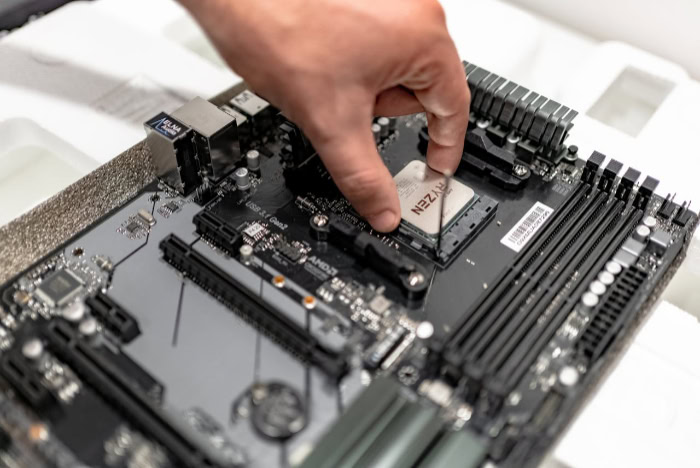
The physical hardware inside a computer dictates how effectively the machine processes information under sustained workloads. Although standard desktops and professional workstations utilize processors, memory, and graphics cards, the underlying architectures of these components serve fundamentally different operational priorities.
Processor Architecture and Core Capacity
Consumer processors, such as the Intel Core and AMD Ryzen families, emphasize high clock speeds on a moderate number of processing cores. Modern consumer chips often reach boost clock speeds exceeding 5.0 GHz, delivering immediate responsiveness in everyday tasks, fast application loading, and high frame rates in gaming.
These processors typically feature between 6 and 24 cores, using a combination of high-performance cores and energy-efficient cores to handle routine multitasking.
Enterprise processors, such as Intel Xeon and AMD Threadripper, emphasize wide multi-threaded execution and massive data throughput. These processors can provide 32, 64, or even 96 cores within a single chip, accompanied by large memory caches exceeding 256MB.
While base clock speeds are often lower than those found on consumer chips, the sheer number of parallel processing threads allows workstations to finish massive calculations efficiently. Enterprise motherboards also support multi-processor configurations, allowing two physical processors to share compute tasks on a single board, while offering specialized instruction sets designed for cryptographic acceleration and mathematical modeling.
System Memory and Error Correction Code
Conventional desktop computers utilize non-ECC (Error-Correcting Code) memory. Standard RAM stores data in electrical capacitors that are vulnerable to bit-flips caused by cosmic radiation, thermal spikes, or electrical noise.
When a bit flips from a zero to a one, a consumer desktop may crash to a blue screen, terminate an application, or quietly save a corrupted document. For casual users, restarting the computer resolves the issue with minimal disruption.
Workstations solve this vulnerability by using ECC memory. ECC modules contain additional memory chips and parity controllers that detect and correct single-bit memory errors in real time while logging multi-bit errors.
This error correction prevents sudden system halts and protects critical computations from silent calculation errors. Memory capacity also separates the two tiers.
Consumer motherboards typically cap system memory at 128GB or 192GB across four memory slots, whereas professional workstation motherboards offer 8 to 16 slots that support multi-terabyte memory ceilings using registered DIMMs.
Consumer Graphics vs. Professional Graphics
Consumer graphics cards, such as the NVIDIA GeForce and AMD Radeon series, are built for entertainment, consumer creative tasks, and real-time gaming. Their internal firmware and software drivers prioritize high polygon fill rates, rapid texture decompression, and variable refresh rates.
While consumer cards offer substantial computing performance, their hardware focuses on single-precision floating-point operations (FP32), which suits visual gaming but lacks precision for specialized engineering.
Professional graphics cards, including the NVIDIA RTX Pro series and AMD Radeon Pro series, are engineered for visual accuracy, extreme memory bandwidth, and sustained double-precision floating-point calculations (FP64). These graphics cards often feature massive video memory capacities, reaching 48GB or more on a single card, complete with ECC protection.
Professional graphics drivers are thoroughly tested for color accuracy, geometry precision, and compatibility with scientific software, ensuring that physical simulations and architectural renderings reflect exact mathematical dimensions without visual artifacts.
System Reliability and Operational Stability

Reliability distinguishes professional production hardware from consumer-grade systems. A system intended for commercial production must maintain operational stability across thousands of operating hours without degraded performance or catastrophic component failure.
Independent Software Vendor Certification
Independent Software Vendor (ISV) certification is an industry testing standard awarded to hardware configurations that have been validated by enterprise software companies. Software providers, including Autodesk, Adobe, and Dassault Systèmes, partner with hardware manufacturers to test specific combinations of processors, motherboards, and professional graphics cards.
This testing ensures that complex applications, such as AutoCAD, Premiere Pro, and SolidWorks, run reliably with minimal software bugs. Hardware manufacturers release dedicated, certified drivers specifically tuned for these programs.
For enterprise organizations, ISV certification guarantees that the software vendor will provide full technical support, eliminating driver incompatibilities that frequently disrupt consumer hardware running professional applications.
Thermal Management for Continuous Operation
Standard desktop computers rely on cooling solutions designed for intermittent thermal loads. Everyday tasks, such as browsing the web or launching an application, create temporary spikes in temperature that fans can dissipate quickly.
While consumer gaming PCs feature liquid cooling or multi-fan arrays, these setups are rarely calibrated to run under 100% component utilization for days without thermal throttling.
Workstations are built from the ground up for continuous thermal endurance. Chassis enclosures feature high-static-pressure fans, specialized airflow baffles, and heavy heat sinks designed to channel cool air across processors, memory modules, storage arrays, and power delivery circuits simultaneously.
Workstation power supplies utilize industrial-grade internal capacitors rated for 24-hour operation, carrying 80 Plus Platinum or Titanium efficiency certifications. This thermal control prevents component degradation, ensuring that prolonged rendering tasks run at maximum frequency without heat-induced slowdowns.
Enterprise Support and Extended Warranty Protection
Purchasing consumer hardware typically includes standard retail warranty coverage. If a consumer desktop fails, the owner must troubleshoot the problem, contact general customer support, and ship the unit to a central depot for a repair process that can take two to three weeks.
Workstations include enterprise support contracts designed to minimize commercial downtime. These warranties often provide round-the-clock telephone support and guaranteed next-business-day on-site service from certified technicians.
In addition, workstation manufacturers guarantee the availability of identical hardware components for three to five years. This parts consistency enables corporate IT departments to maintain a uniform fleet of machines, deploy standardized software images, and replace failing parts quickly without encountering driver conflicts.
Task Performance and Practical Workloads

Hardware specifications translate into different practical outcomes depending on the software being executed. Assessing typical computing workloads reveals why raw hardware cost does not always guarantee faster completion times across every task.
General Office Productivity and Web Applications
Everyday office productivity relies on single-threaded processor speed rather than high core counts. Applications like Microsoft Word, spreadsheet programs, web browsers, and media players execute their instructions sequentially on one or two processing cores.
Because consumer processors feature high single-core boost clock speeds, a standard $800 desktop often feels equally responsive, or even faster, than a $5,000 workstation during basic office routines. Workstation processors feature lower baseline clock speeds across their numerous cores, offering no practical advantage for administrative tasks.
Deploying workstation-class hardware for basic word processing, data entry, and email correspondence introduces substantial financial waste without yielding measurable performance benefits.
Digital Media Creation and Visual Design
Content creation workflows occupy a middle territory where project complexity determines the ideal hardware category. Standard desktop systems excel at 2D graphic design, audio production, and standard 4K video editing using compressed formats.
A modern consumer desktop equipped with 32GB of RAM and a consumer graphics card easily handles standard multi-track video timelines.
Workstations become necessary when media production scales up to multi-layer 8K raw video footage, complex visual effects compositions, and multi-hour 3D rendering. These demanding tasks require sustained memory throughput, vast storage bandwidth over multiple PCIe 5.0 solid-state drives, and dedicated video memory capacities exceeding 24GB.
The workstation enables visual artists to preview complex scenes without dropped frames and renders production-ready assets without running out of system memory.
Scientific Computation and Complex Simulation
Engineering and scientific software workloads demand absolute computational accuracy and large memory bandwidth. Applications that run Finite Element Analysis (FEA), Computational Fluid Dynamics (CFD), and large-scale demographic simulations rely on multi-channel memory architectures to stream huge datasets into the processor.
In these specialized fields, calculation errors produce severe financial, structural, and medical consequences. An undetected bit-flip during the structural stress simulation of an aerospace part or a bridge component can compromise physical safety.
Workstations equipped with ECC memory and double-precision professional GPUs maintain arithmetic accuracy throughout computations that take days to complete, ensuring that simulation data remains trustworthy.
Selection Criteria and Investment Value

Evaluating a hardware purchase requires assessing both upfront financial commitments and the recurring costs associated with operational downtime. Balancing system cost against productivity needs allows buyers to select a computing platform that meets specific business requirements.
Upfront Cost and Total Cost of Ownership
Standard consumer desktops range in price from $500 for entry-level machines to $2,500 for high-tier configurations. In contrast, professional workstations start around $2,000 for baseline units and frequently exceed $10,000 to $20,000 for multi-GPU, high-core enterprise setups.
Evaluating this price disparity requires calculating the total cost of ownership. Workstations draw substantial electrical power, often requiring 1,000W to 1,600W power supplies that increase building utility expenses and heat office spaces.
However, for organizations that bill clients by the hour or operate under tight project deadlines, the return on investment comes from accelerated project completion and the elimination of hardware-induced downtime. A machine that prevents a lost production day can offset its initial purchase premium within months.
Workflow Criticality and Crash Tolerance
System selection depends heavily on the cost of unexpected failure. When a standard desktop crashes during a personal gaming session or while drafting a personal document, the consequence is usually minor inconvenience.
When a system crashes during a commercial deadline, the financial fallout includes lost client billings, corrupted project databases, and delayed production schedules.
Determining whether a workflow justifies workstation hardware involves assessing operational vulnerability through a sequential review:
- Calculate the financial cost of an hour of system downtime or lost employee productivity.
- Review whether primary professional software tools require ISV certification for customer support eligibility.
- Determine the duration of continuous, unattended rendering or data processing sessions needed each week.
- Check whether project data files exceed standard consumer memory limits of 128GB.
- Evaluate whether silent data corruption poses financial, safety, or legal liabilities to the business.
Component Expandability and Lifecycle Duration
Consumer motherboards provide limited expansion options, typically offering between 16 and 24 PCIe lanes directly from the processor. This bandwidth allows for a single primary graphics card and one or two high-speed storage drives before sharing bandwidth with other system components.
Consumer systems typically follow a three- to four-year upgrade cycle as hardware demands change.
Workstation motherboards offer 64 to 128 PCIe lanes, accommodating multiple professional graphics cards, specialized capture hardware, high-speed network cards running at 10Gbps or 25Gbps, and multi-drive NVMe storage arrays. This physical expandability, paired with robust chassis designs, supports an extended lifecycle of five to seven years.
Organizations can upgrade memory, storage, and add-in cards incrementally, maintaining operational relevance across several hardware generations.
Conclusion
The fundamental divide between a standard desktop computer and a professional workstation centers on consumer speed and value versus enterprise endurance and data accuracy. Standard desktops provide exceptional responsiveness, high single-core clock speeds, and affordable access for everyday productivity and entertainment.
However, these consumer platforms lack the structural safeguards required for continuous, heavy computational loads. Workstations demand a significantly larger initial investment, but they deliver indispensable capabilities through error-correcting memory, continuous thermal resilience, certified application drivers, and massive multi-threaded processing.
Choosing the correct platform requires a realistic assessment of operational risk, crash tolerance, and project complexity. Aligning hardware investments directly with daily operational demands ensures that everyday users avoid overpaying for unnecessary enterprise hardware, while commercial professionals preserve business revenue, software stability, and mission-critical data integrity.
Frequently Asked Questions
Can I use a gaming computer as a workstation?
Yes, a gaming computer can handle lighter creative tasks, but it lacks the specialized stability needed for heavy enterprise work. Consumer graphics cards and standard RAM lack error-correcting features and certified software drivers. While games and basic video edits run smoothly, complex 3D rendering or long computational simulations may crash or suffer from data corruption without workstation components.
Why do workstations need ECC RAM?
Workstations use ECC RAM because it detects and fixes memory errors before they cause system crashes or file corruption. Standard memory is vulnerable to random electrical interference that changes data bits. While an everyday computer might simply crash, ECC memory stops silent calculation mistakes that could ruin hours of scientific simulations, architectural blueprints, or client video renders.
Will a workstation make regular office programs run faster?
No, a workstation will not make standard office applications run noticeably faster than a regular desktop. Programs like word processors and web browsers rely on single-core processor speed rather than dozens of cores. Because standard desktops feature high single-core boost clock speeds, everyday administrative software feels equally responsive, or even faster, on an affordable consumer machine.
What is an ISV certification and do I need one?
An ISV certification is an official guarantee that professional software has been tested to run reliably on specific computer hardware. Software vendors like Autodesk and Adobe work with manufacturers to eliminate technical bugs and tune dedicated drivers. You only need this certification if you use commercial engineering, 3D animation, or design tools where system crashes cost money.
How long does a workstation last compared to a normal desktop?
A professional workstation typically lasts five to seven years, while a standard desktop is usually replaced after three to four years. Workstations use heavy-duty cooling setups, robust power supplies, and highly expandable motherboards. This durable construction allows users to upgrade memory, storage, and graphics cards over time, keeping the system productive across multiple hardware cycles.
About the Author: Elizabeth Baker


